Numbers, arithmetic and complex numbers in Scientific calculator plus 991 for Android
Fractions, percentages, remainders, prime factors, nCr and nPr, powers, roots, logarithms and trigonometry all work in MATH, the mode for general calculations, with the keys or with the functions printed above them for SHIFT and ALPHA. Two jobs need a mode of their own, chosen under MODE: complex numbers need CMPLX, and binary, octal and hexadecimal need BASE-N, which also holds the bitwise operations AND, OR, XOR and NOT. Whole numbers are kept exactly, up to roughly 98,600 digits.
- Modes
- MATH, CMPLX and BASE-N, under MODE
- Whole numbers
- exact, up to roughly 98,600 digits
- Decimals
- worked to up to 512 significant digits
- Answers
- exact (FRAC) at first; S⇌D for decimals
Most of this chapter is a single key press away: a key, or the SHIFT or ALPHA function printed above one, in the mode for general calculations. This page says which mode and which page each job needs, where the keys are, and how the calculator holds numbers and shows its answers.
Which page for which job
| The job | The page |
|---|---|
| Type a fraction or a mixed number; add and subtract them; recurring decimals | Fractions and recurring decimals |
| A percent of a number, what percent one is of another, an increase or a discount | Percentages |
| A remainder (mod), quotient and remainder together (÷R), rounding down or up, the absolute value | Remainders, floor and ceiling |
| Prime factors, the greatest common divisor, the least common multiple | Prime factorisation, GCD and LCM |
| n!, nCr, nPr and random numbers | Factorials, nCr and nPr |
| Powers; square, cube and nth roots; eˣ and 10ˣ; ln, log and logₓy for any base | Powers, roots and logarithms |
| The angle unit, degrees, minutes and seconds, the six trigonometric functions and the hyperbolic ones | Angle units and trigonometry |
| Rectangular to polar coordinates and back | Pol and Rec |
| a + bi, the polar form, the modulus, the argument, the conjugate | Complex numbers |
| Binary, octal, decimal and hexadecimal, and converting between them | Binary, hex and octal |
| AND, OR, XOR, NOT, bit shifts, and True or False comparisons | Logic operations |
The three modes this chapter uses
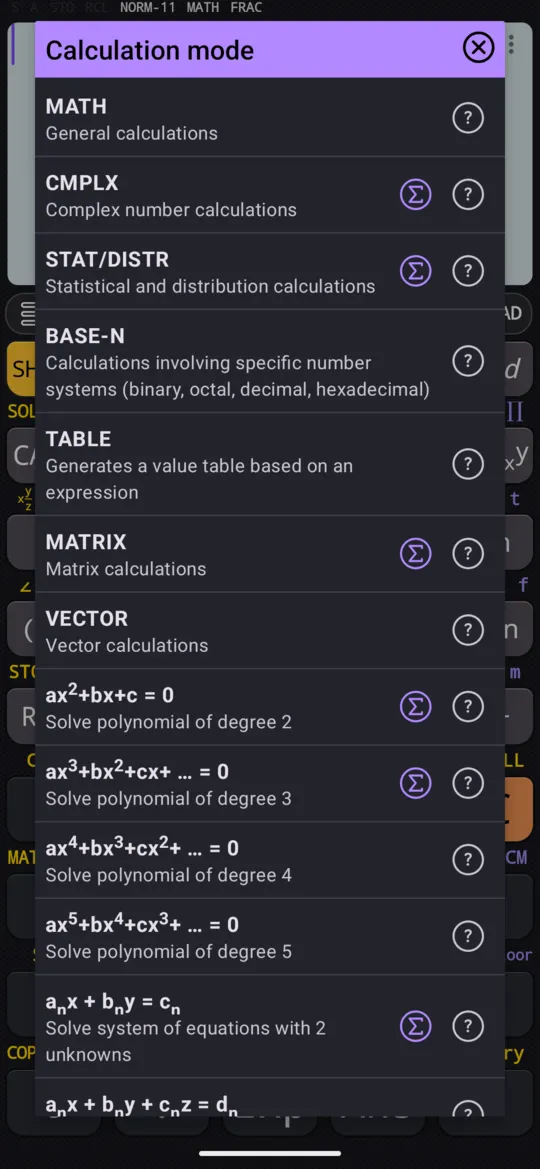
Press MODE and choose one from the Calculation mode dialog.
- MATH, general calculations, is where nearly all of this chapter works: fractions, percentages, factorials, powers, logarithms, trigonometry, prime factors.
- CMPLX is for complex numbers: the complex menu is on SHIFT 2 CMPLX, and an odd root of a negative number gives the principal complex value rather than the real one (roots of negative numbers).
- BASE-N turns the calculator into a programmer's calculator: DEC, HEX, BIN and OCT keys, the digits A to F, a choice of 8, 16, 32 or 64 bits, and the bitwise AND, OR, XOR and NOT.
The logic comparisons that answer True or False are not a mode at all: they are on the 2nd keyboard, which the 2nd key opens, and they work in MATH.
The functions above the keys
Most functions in this chapter are printed above a key: yellow for SHIFT, violet for ALPHA. Press SHIFT or ALPHA, then the key.
| Keys | Function | Page |
|---|---|---|
| SHIFT x/y, ALPHA x² | A mixed number, a recurring decimal | Fractions |
| SHIFT ( % | Percent | Percentages |
| ALPHA √x mod | Remainder of a division | Remainders |
| ALPHA x/y ÷R | Quotient and remainder together | Remainders |
| ALPHA - Floor, ALPHA + Ceil | Round down, round up | Remainders |
| SHIFT hyp |x| | Absolute value, Abs | Remainders |
| SHIFT °'" FACT | Prime factors | Prime factorisation |
| ALPHA × GCD, ALPHA ÷ LCM | Greatest common divisor, least common multiple | Prime factorisation |
| SHIFT x⁻¹ x! | Factorial | Factorials |
| SHIFT ÷ nCr, SHIFT × nPr | Combinations, permutations | Factorials |
| SHIFT . Ran#, ALPHA . RanInt | A random number, a random whole number | Factorials |
| SHIFT x² x³ | Cube | Powers |
| SHIFT √x ³√x, SHIFT xʸ ˣ√y | Cube root, nth root | Powers |
| SHIFT ln eˣ, SHIFT log 10ˣ | e and 10 to a power | Powers |
| SHIFT Sin Sin⁻¹, and the same on Cos and Tan | The inverse functions | Trigonometry |
| ALPHA ENG Cot, ALPHA ( Cot⁻¹ | Cotangent and its inverse | Trigonometry |
| SHIFT + Pol, SHIFT - Rec | Rectangular to polar, polar to rectangular | Pol and Rec |
| SHIFT ENG i, SHIFT (-) ∠ | The imaginary unit, the angle sign | Complex numbers |
Arithmetic and the order of operations
Type a calculation the way it is written and press =.
in 23 - 7
out 16
When an expression mixes operators, the calculator applies operator precedence: in 2 + 7 ÷ 3 the division comes first. Brackets change the order, and an expression may hold as many as you need.
in (2 + 7) ÷ 3
out 3
A bracket left open is closed for you when you press =:
in 5 × (2 + 3
out 25
Two or more calculations can share one line, separated by semicolons: press ALPHA ∫dx for each. Each press of = then works out the next calculation, left to right; here the first press gives 6, and the second 9.
in 3 + 3; 3 × 3
out 6
Only = saves a calculation to the history. The answer that appears as you type, when Automatically calculate is on in Settings, is only a preview: it is saved when you press =.
How large a number can be
Two limits apply, because whole numbers and decimals are held in different ways.
- Whole numbers are kept exactly, every digit and nothing rounded off the end, up to roughly 98,600 digits. That is why 100! comes back with all 158 of its digits, and 2¹⁰⁰⁰ with all 302.
- Decimals are worked to up to 512 significant digits, and a number that would need more is rounded to fit. The answer line shows fewer: 5/6 as a decimal reads 0.83333333333.
Both sit far beyond ordinary work: writing out the number of atoms in the observable universe takes only about 80 digits.
Exact answers and decimals
The calculator starts in symbolic calculation, FRAC on the status line, so answers stay exact: 5/6 stays a fraction. S⇌D switches to numeric calculation, DECI, where answers come as decimals, and back again; the choice holds for the calculations that follow.
Touch an answer to open the Result format dialog, which shows it in every form that fits: a decimal, a repeating decimal, a fraction, a mixed number, degrees, minutes and seconds, or, for a complex answer, polar form.
At a glance
| Keys | What they do |
|---|---|
| MODE | Chooses MATH, CMPLX, BASE-N and the other modes |
| = | Works out the calculation; closes any bracket left open |
| ALPHA ∫dx ; | Separates two calculations on one line |
| S⇌D | Switches between symbolic (exact) and numeric (decimal) calculation |
| 2nd | The 2nd keyboard, with the True/False comparisons |
Questions
Does the calculator follow the order of operations?
Yes. When an expression mixes operators, the calculator applies operator precedence, and brackets change the order: (2 + 7) ÷ 3 is 3. An expression can hold as many brackets as you need, and = closes any still open, so 5 × (2 + 3, typed without its last bracket, still gives 25.
How many digits can a result have?
Whole numbers keep every digit up to roughly 98,600 of them, so 100! comes back with all 158 of its digits and 2¹⁰⁰⁰ with all 302. Decimals are worked to up to 512 significant digits and rounded beyond that; the answer line shows fewer, so 5/6 as a decimal reads 0.83333333333.
Which mode do I need for complex numbers or binary?
CMPLX for complex numbers, and BASE-N for binary, octal and hexadecimal and the bitwise operations AND, OR, XOR and NOT; both are under MODE. Everything else in this chapter, fractions, percentages, powers, logarithms and trigonometry included, works in MATH, the mode for general calculations.
Can I put two calculations on one line?
Yes. Put a semicolon (ALPHA ∫dx) between them, and each press of = works out the next one, left to right: 3 + 3 ; 3 × 3 gives 6 at the first press of =, and 9 at the second.
Related pages
- Fractions, mixed numbers and recurring decimals x/y and SHIFT x/y, adding and subtracting them, recurring decimals, S⇌D
- Percentages percent of a number, what percent, increases and discounts, and the setting
- Powers, roots and logarithms x², xʸ and x³; square, cube and nth roots; eˣ, 10ˣ, ln, log and a log to any base
- Angle units and trigonometry degrees, radians, gradians, the six trig functions and inverses, hyperbolics, DMS
- Complex numbers CMPLX mode, a + bi and r∠θ, Re, Im, Abs, Arg, the conjugate and the polar form
- Binary, octal, decimal and hexadecimal the four bases, converting an answer, the digits A to F, and the bit size
Written from the calculator's own manual and from the app itself, version 7.6.0; every figure is one the manual shows or a capture of the app proves. Last revised on 29 September 2026.
Bug reports and feature requests go to kimcuc@samatica.com — a person reads it.