Complex numbers: a + bi, polar form, modulus, argument and conjugate in Scientific calculator plus 991 for Android
Press MODE and choose CMPLX. Type i with SHIFT ENG and the angle sign with SHIFT (-), so a number goes in as 3 + 5i or as 3∠90. SHIFT 2 opens the complex menu: Re and Im for the real and imaginary parts, Abs for the modulus, Arg for the argument, Conjg for the conjugate, and ►r∠φ for the polar form. Abs(1 − i) is √2, and in degrees Arg(−2 + 2i) is 135 and 4 + 4i in polar form is (4√2)∠45.
- Mode
- MODE, then CMPLX
- Typing
- i is SHIFT ENG; the angle sign is SHIFT (-)
- Complex menu
- SHIFT 2: Arg, Conjg, Re, Im, ►r∠φ, ►a+bi, Abs
- Angles
- in the angle unit that is set, DEG in these examples
Complex numbers have a mode of their own, CMPLX. In it the arithmetic operations, powers, logarithms and the trigonometric and hyperbolic functions all accept complex numbers and can return them, and a menu on SHIFT 2 gives a number's real and imaginary parts, modulus, argument and conjugate, and switches it between rectangular and polar form.
CMPLX mode
Press MODE and choose CMPLX. The status line then reads CMPLX.
- i, the imaginary unit: press SHIFT ENG i after the imaginary part.
- ∠, the angle sign: press SHIFT (-) ∠ between the modulus and the angle of a number in polar form.
- The complex menu: press SHIFT 2 CMPLX to open it.
Typing a complex number
In rectangular form, a + bi, type it as it is written, with i after the imaginary part:
in 3 + 5i
In polar form, r∠θ, type the modulus r (the distance from 0), the angle sign, then the angle θ. The angle is read in the angle unit that is set, DEG, RAD or GRA on the key just under the display (angle units). The examples here are in degrees:
in 3 ∠ 90
out i × 3
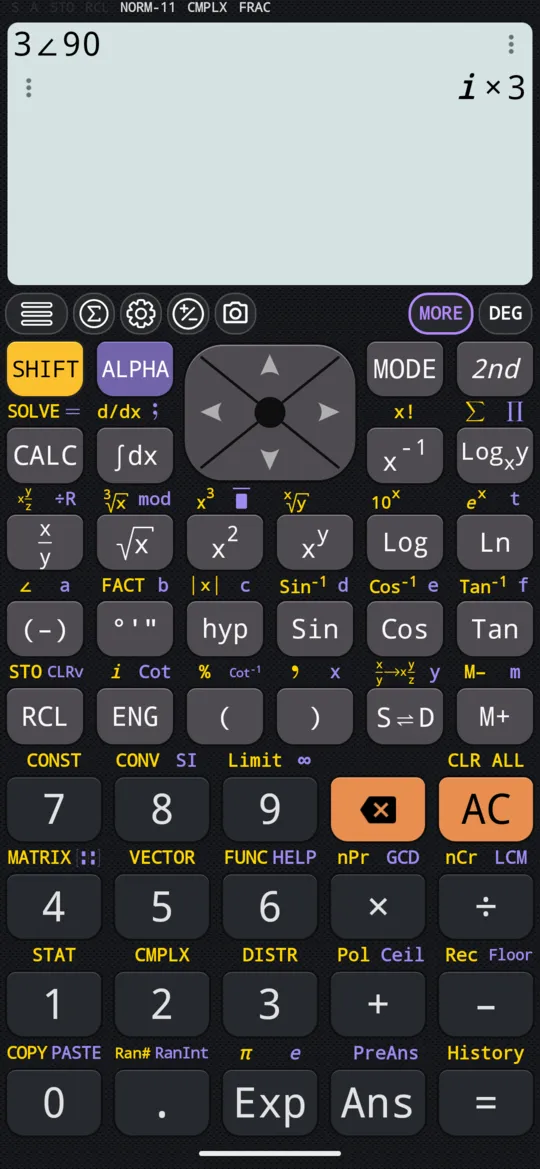
In an exact answer the calculator writes i first, then its coefficient: i × 3 is 3i. A decimal answer puts i last, as in 1.5 + 2.59807621135i further down.
The complex menu
Press SHIFT 2 CMPLX to open a menu of seven entries:
- Arg: the argument of the number.
- Conjg: its conjugate, spelled out as Conjugate on the input line.
- Re: its real part.
- Im: its imaginary part.
- ►r∠φ: shows the answer in polar form.
- ►a+bi: shows the answer in rectangular form.
- Abs: its modulus.
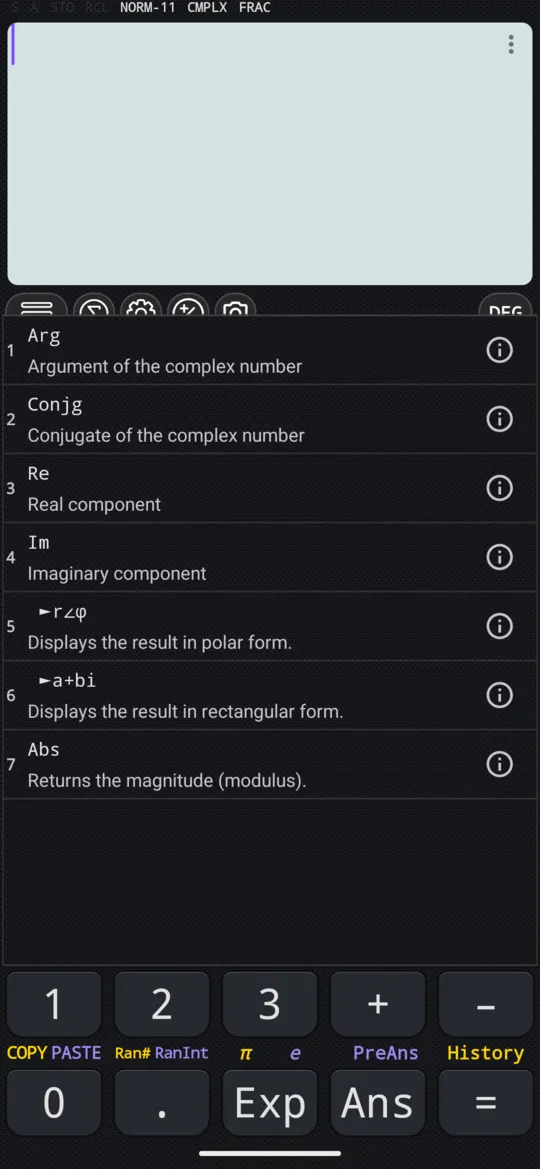
Real part, imaginary part, modulus, argument, conjugate
Choose the function on the menu, type the number and press =.
in Re(4 + 6i)
out 4
in Im(4 + 6i)
out 6
in |1 - 1i|
out √2
in Arg(-2 + 2i)
out 135
in Conjugate(4 + 6i)
out 4 - i × 6
The argument comes in the angle unit that is set. Abs also has a key of its own: press SHIFT hyp |x| in CMPLX or in the ordinary MATH mode. Either way the calculator draws it as two bars round the number; more is on the absolute value page.
Rectangular and polar form
A complex number can be written in two forms: rectangular, a + bi, and polar, r∠θ, where r is the modulus and θ the argument, the angle from the positive real axis. The calculator shows an answer in one of them; there are two ways to see it in the other.
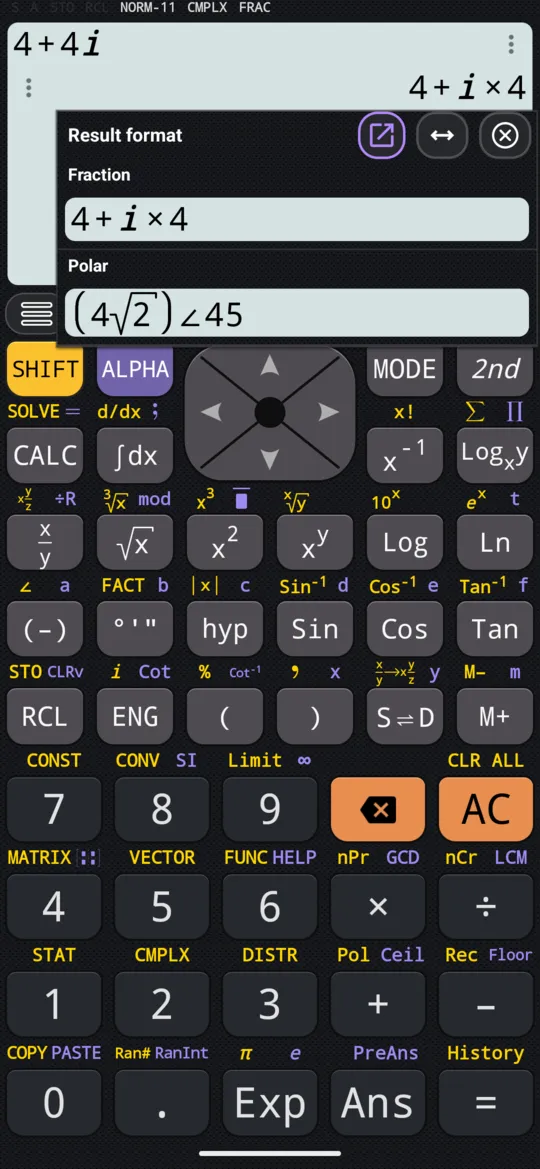
Touch the answer. The Result format dialog shows it in both forms, the rectangular one under the heading Fraction and the polar one under Polar:
in 4 + 4i
out 4 + i × 4
in 4 + 4i
out (4√2) ∠ 45
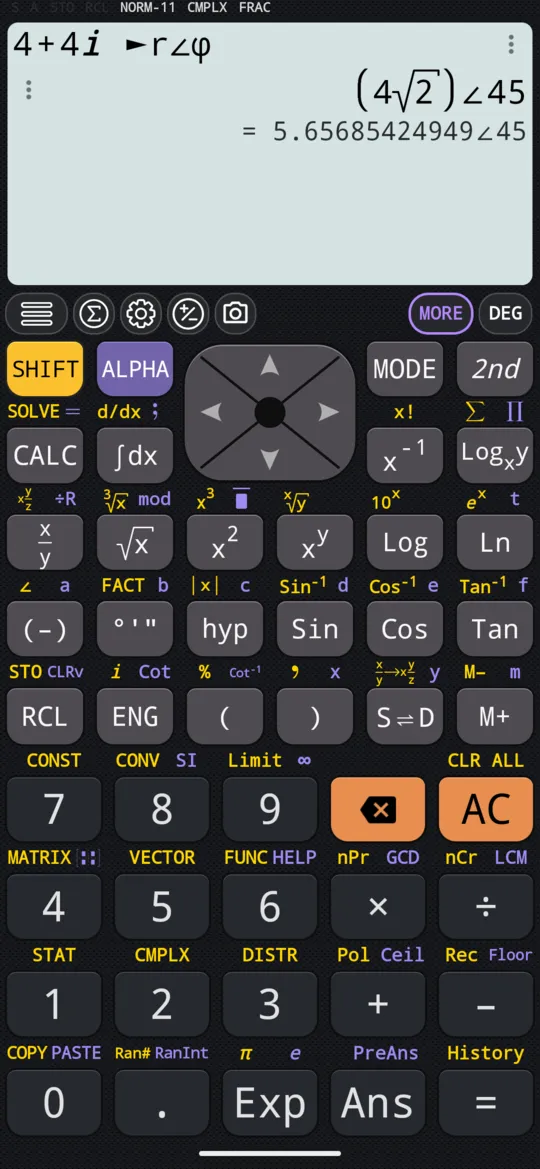
Add a command at the end. Type the calculation, press SHIFT 2 CMPLX and choose ►r∠φ, then press =: the answer comes in polar form. ►a+bi, in the same place, gives it in rectangular form instead. Either one overrides the calculator's complex number format setting for that answer.
in 4 + 4i ►r∠φ
out (4√2) ∠ 45
To convert a point's coordinates, from x and y to r and θ and back, see Pol and Rec.
Roots of negative numbers
The mode changes what a root of a negative number means. Outside CMPLX, an odd root of a negative number gives the real root:
in ³√(-27)
out -3
In CMPLX the same input gives the principal complex root instead of −3. In symbolic calculation, FRAC on the status line, it stays exact, with its decimal beneath:
in ³√(-27)
out 3³√(-1)
Press S⇌D to switch to numeric calculation, DECI, and the decimal becomes the answer:
in ³√(-27)
out 1.5 + 2.59807621135i
The equation modes give complex roots too: see cubic, quartic and quintic equations.
At a glance
| Keys | What they do |
|---|---|
| MODE, CMPLX | Enters CMPLX mode |
| SHIFT ENG i | Types i, the imaginary unit |
| SHIFT (-) ∠ | Types the angle sign ∠, for r∠θ |
| SHIFT 2 CMPLX | Opens the complex menu: Arg, Conjg, Re, Im, ►r∠φ, ►a+bi, Abs |
| SHIFT hyp |x| | Types Abs, the modulus |
| S⇌D | Switches between exact and decimal |
Questions
How do I type a complex number?
In CMPLX mode, type the real part, then + or −, then the imaginary part followed by i, which is SHIFT ENG: 3 + 5i. For the polar form, type the modulus, SHIFT (-) for the angle sign, then the angle in the angle unit that is set: 3∠90 in degrees is 3i, which the calculator writes as i × 3.
How do I find the modulus and argument of a complex number?
Abs gives the modulus and Arg the argument, both on the complex menu, SHIFT 2. Abs(1 − i) is √2, and in degrees Arg(−2 + 2i) is 135. Abs is also on SHIFT hyp, and works in the ordinary MATH mode as well: Abs(3 + 4i) is 5.
How do I convert a complex number to polar form?
Put ►r∠φ from the complex menu at the end of the calculation, before =, or touch an answer to see both of its forms. In degrees, 4 + 4i ►r∠φ gives (4√2)∠45. ►a+bi turns an answer back into rectangular form.
Why does 4 + 4i come back as 4 + i × 4?
That is how the calculator writes the imaginary part of an exact answer: i first, then its coefficient, with a × between them. 4 + i × 4 is the same number as 4 + 4i, and 4 − i × 6, the conjugate of 4 + 6i, is 4 − 6i. A decimal answer is written the usual way, 1.5 + 2.59807621135i.
Related pages
- Rectangular and polar coordinates Pol and Rec: x and y to r and θ, and back again
- Powers, roots and logarithms x², xʸ and x³; square, cube and nth roots; eˣ, 10ˣ, ln, log and a log to any base
- Solve cubic, quartic and quintic equations, including complex roots three, four or five roots, complex ones included
- Remainders, mod, floor, ceiling and absolute value mod and ÷R, rounding down and up, and the absolute value
- Angle units and trigonometry degrees, radians, gradians, the six trig functions and inverses, hyperbolics, DMS
- Numbers, arithmetic and complex numbers which mode and which page, the keys, and how numbers are held
Written from the calculator's own manual and from the app itself, version 7.6.0; every figure is one the manual shows or a capture of the app proves. Last revised on 29 September 2026.
Bug reports and feature requests go to kimcuc@samatica.com — a person reads it.