Solve cubic, quartic and quintic equations, including complex roots in Scientific calculator plus 991 for Android
Press MODE and choose Solve polynomial of degree 3, 4 or 5, type the coefficients from the highest power down, and press =. The roots come one at a time: three for a cubic, four for a quartic, five for a quintic, with any that are not real given as complex conjugate pairs. x³ − 6x² + 11x − 6 = 0 gives 1, 2 and 3.
- Modes
- Solve polynomial of degree 3, 4 or 5
- Cells
- 4 for a cubic, 5 for a quartic, 6 for a quintic
- Roots
- always as many as the degree; some may be equal or complex
- Stored
- nothing: the roots are displayed only
Above degree 2 the answer is simply the roots, all of them. The three modes work exactly alike and differ only in the number of cells, so this page takes the cubic through step by step and then shows what changes at degrees 4 and 5.
Solve it
To solve a cubic equation
-
Press MODE and choose Solve polynomial of degree 3. The Coefficient Editor appears: one row of four cells, for a, b, c and d.
-
Type each coefficient and press =, from a, the coefficient of x³, down to d, the constant. Enter 0 for a term the equation leaves out.
-
Press = again, or tap SOLVE [=], and x1 appears.
-
Press = for x2 and again for x3. After the last root, the editor comes back with your coefficients.
x³ - 6x² + 11x - 6 = 0
| a | b | c | d |
|---|---|---|---|
| 1 | -6 | 11 | -6 |
out x1= 1
x2= 2
x3= 3
Degrees 4 and 5
Choose Solve polynomial of degree 4 or Solve polynomial of degree 5 instead, and the editor grows by a cell for each power. The rest is the same.
| Mode | The equation | Cells | Roots |
|---|---|---|---|
| Degree 3 | ax³ + bx² + cx + d = 0 | a to d | x1 to x3 |
| Degree 4 | ax⁴ + bx³ + cx² + dx + e = 0 | a to e | x1 to x4 |
| Degree 5 | ax⁵ + bx⁴ + cx³ + dx² + ex + f = 0 | a to f | x1 to x5 |
A polynomial of degree n always has n roots, counted with repetition, so the list is never short: some roots may be equal, and some may be complex. Degree 5 can take a moment longer to solve than the others.
x⁴ - 10x³ + 35x² - 50x + 24 = 0
| a | b | c | d | e |
|---|---|---|---|---|
| 1 | -10 | 35 | -50 | 24 |
out x1= 1
x2= 2
x3= 3
x4= 4
x⁵ - 15x⁴ + 85x³ - 225x² + 274x - 120 = 0
| a | b | c | d | e | f |
|---|---|---|---|---|---|
| 1 | -15 | 85 | -225 | 274 | -120 |
out x1= 1
x2= 2
x3= 3
x4= 4
x5= 5
Complex roots
A root that is not real still comes back, as a complex number a + bi, and non-real roots always arrive in conjugate pairs, a + bi together with a − bi.
- A cubic always has at least one real root; the other two may be a conjugate pair.
- A quartic has 0, 2 or 4 real roots.
- A quintic always has at least one real root, and any of the rest that are not real come in pairs.
x³ - 2x² + 2x - 1 = 0
| a | b | c | d |
|---|---|---|---|
| 1 | -2 | 2 | -1 |
out x1= 1
x2= 1/2 - (i/2)√3
x3= 1/2 + (i/2)√3
x⁴ - 4x³ + 6x² - 5x + 2 = 0
| a | b | c | d | e |
|---|---|---|---|---|
| 1 | -4 | 6 | -5 | 2 |
out x1= 1
x2= 2
x3= 1/2 - (√3/2)i
x4= 1/2 + (√3/2)i
Tap a root to switch it between a fraction and a decimal. Coefficients may be complex numbers too.
The roots are not stored
Unlike the quadratic mode, these three keep nothing: the roots are displayed only, and X, Y, Z, T and U keep whatever they held before. Note a root down before you leave the answer if a later calculation needs it. Only the quadratic mode copies its roots into variables.
When every coefficient of x is 0
Then the equation is not really a polynomial equation any more, and the calculator says so.
- The constant is not 0. The equation reduces to something like 5 = 0, and a dialog reads No solution. For a cubic, a = 0, b = 0, c = 0, d = 5 is one.
- The constant is 0 too. It reduces to 0 = 0, which every x satisfies, and the dialog reads Infinite solution.
OK returns to the editor.
See it on a graph
GRAPH plots the polynomial in the editor at any time, while typing or with a root on screen. The roots, the turning points and the inflection points are already marked, and each marker can be switched off from the graph screen's own controls.
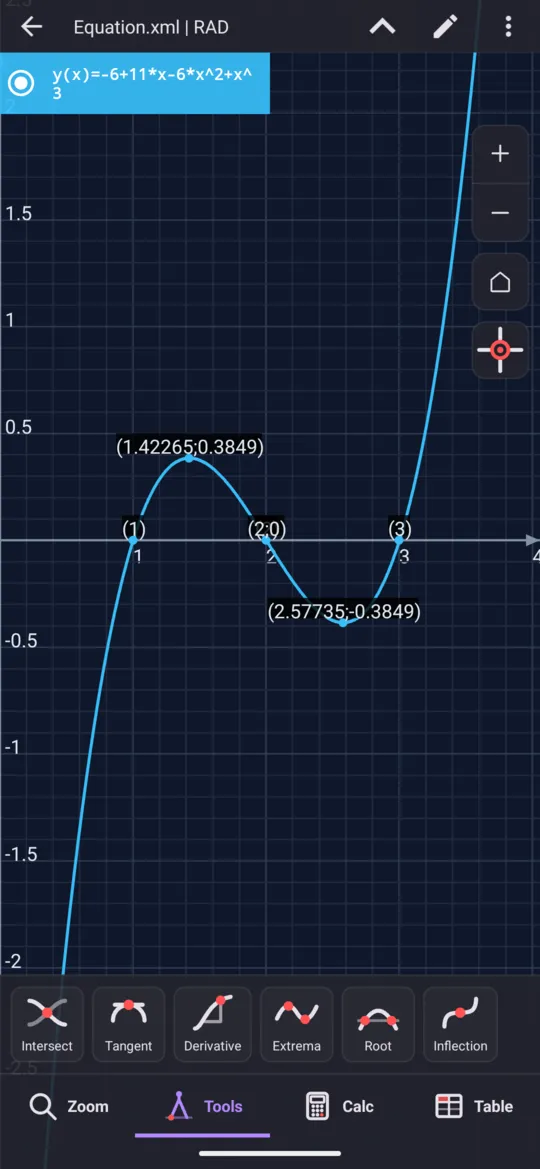
At a glance
| Key | What it does |
|---|---|
| MODE | Choose Solve polynomial of degree 3, 4 or 5 |
| = | Evaluates a cell and moves on; once every cell is in, solves; then steps through the roots, and back to the editor |
| left right | Move between the cells |
| AC | Empties every cell and starts over |
| GRAPH | Plots the polynomial with its roots, turning points and inflection points marked |
The polynomial modes stop at degree 5. An equation of another shape, typed out in full, goes to SOLVE; to write a polynomial as a product of factors instead, use FACTOR.
Questions
Can it solve a quintic equation?
Yes, from its six coefficients in the Solve polynomial of degree 5 mode. It gives all five roots, x1 to x5, real and complex alike: x⁵ − 15x⁴ + 85x³ − 225x² + 274x − 120 = 0 gives 1, 2, 3, 4 and 5. A quintic can take a moment longer to solve than the lower degrees.
Why do some roots have an i in them?
Because not every root of a polynomial is real. A cubic always has at least one real root, but the other two may be a complex conjugate pair, a + bi and a − bi; a quartic can have 0, 2 or 4 real roots. x³ − 2x² + 2x − 1 = 0 gives 1, then 1/2 − (√3/2)i and 1/2 + (√3/2)i.
Are the roots saved anywhere?
No. Above degree 2 the roots are displayed only, and the variables X, Y, Z, T and U keep whatever they held. Note a root down before leaving the answer if you need it later. Only the quadratic mode stores its roots, in X and Y.
Can it solve an equation of degree 6 or higher?
Not from its coefficients: the polynomial modes stop at degree 5. SOLVE, on SHIFT then CALC, takes an equation typed out in full instead, and returns the roots it can find or says Cannot solve equation.
Related pages
- Solve a quadratic equation both roots, the vertex, complex roots and the graph
- Solve polynomial inequalities of degree 2, 3 and 4 the solution set as intervals, and the shaded graph
- SOLVE every root at once, exact, and formulas rearranged
- Factor, expand and simplify algebraic expressions FACTOR, EXPAND and SIMPLY on the 2nd keyboard
- Graphing and tables curves, shaded areas, tables of values
Written from the calculator's own manual and from the app itself, version 7.6.0; every figure is one the manual shows or a capture of the app proves. Last revised on 26 September 2026.
Bug reports and feature requests go to kimcuc@samatica.com — a person reads it.