Factor, expand and simplify algebraic expressions in Scientific calculator plus 991 for Android
Type the expression, press 2nd to open the 2nd keyboard, then FACTOR, EXPAND or SIMPLY. FACTOR turns a polynomial into a product, 1 + 2x + x² into (1 + x)²; EXPAND multiplies out powers and products of sums, (x + y)³ into x³ + 3x²y + 3xy² + y³; SIMPLY rewrites an expression with fewer terms, 2sin(x)² + 2cos(x)² as 2. Letters stay letters throughout.
- Keys
- 2nd, then FACTOR, EXPAND or SIMPLY
- Works on
- the expression on the input line, letters and all
- FACTOR
- a polynomial into a product
- EXPAND, SIMPLY
- multiplied out; fewer terms or operations
Three functions on the 2nd keyboard rewrite an expression instead of working out its value. They take the expression on the input line as it is, letters included, and give back an equivalent one: a product, a sum multiplied out, or a shorter form.
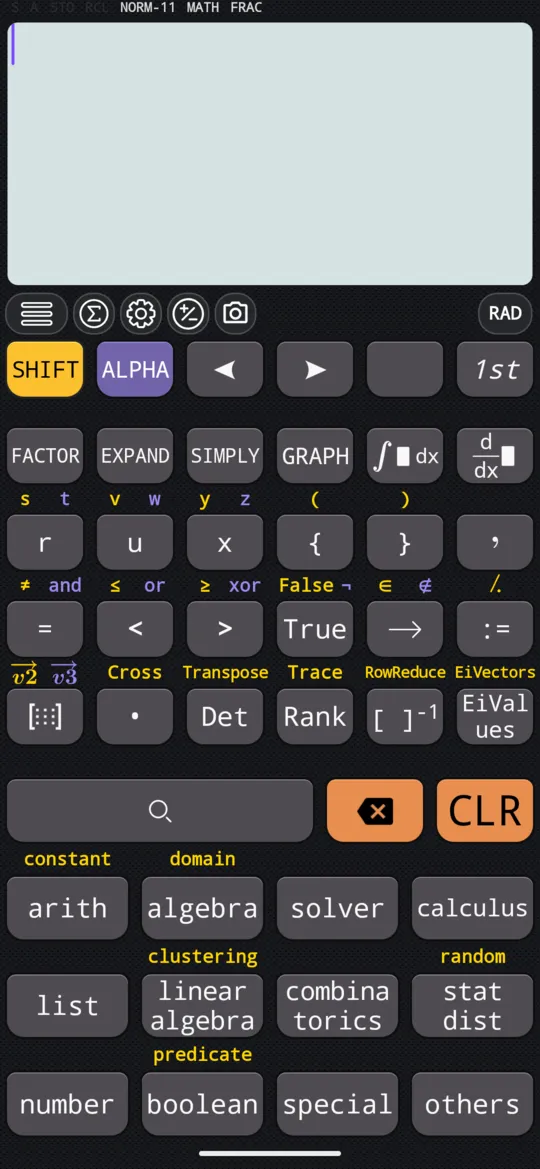
Use them
To factor, expand or simplify
-
Type the expression on the input line. Letters come from ALPHA: x is ALPHA ) x, y is ALPHA S⇌D y, a is ALPHA (-) a.
-
Press 2nd to open the 2nd keyboard.
-
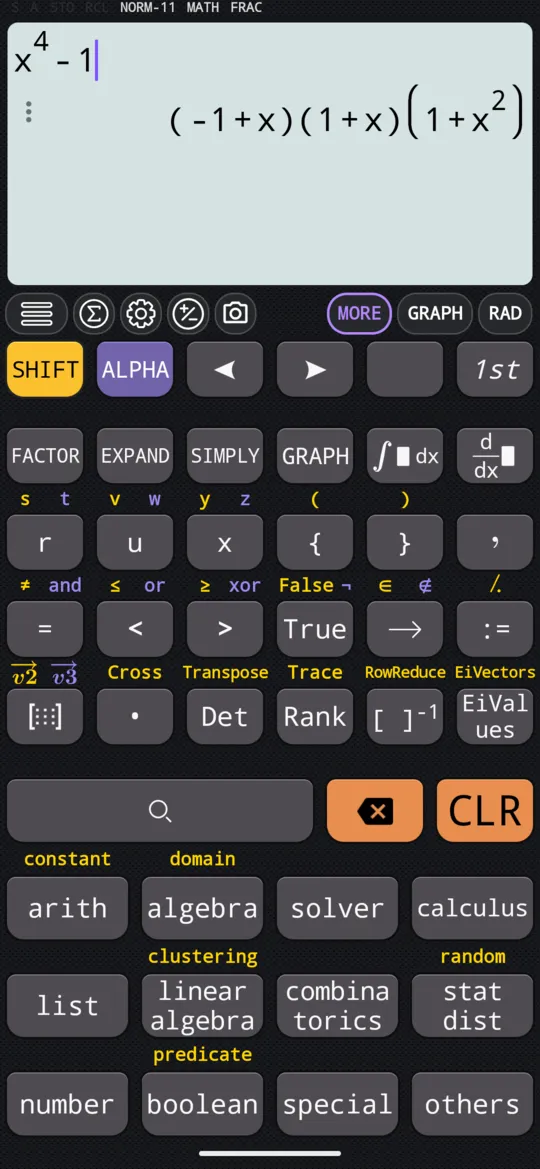
Press FACTOR, EXPAND or SIMPLY. The rewritten expression appears as the answer.
Factor
2nd FACTOR factors a polynomial into a product of simpler expressions.
in 1 + 2x + x²
out (1 + x)²
in x⁴ - 1
out (-1 + x)(1 + x)(1 + x²)
FACTOR rewrites a polynomial; it does not solve it. For the roots, give the same expression to SOLVE, which solves an expression on its own against 0.
Expand
2nd EXPAND expands positive powers and products of sums into a fully multiplied-out expression.
in (x + y)³
out x³ + 3x²y + 3xy² + y³
in (a + b)(a + c + d)
out a² + ab + ac + bc + ad + bd
Simplify
2nd SIMPLY rewrites an expression in an equivalent form with fewer terms or operations. It is not only algebra: it knows trigonometric identities as well.
in ax² + bx²
out (a + b)x²
in 2Sin(x)² + 2Cos(x)²
out 2
sin(x)² + cos(x)² is 1 for every x, so twice it is 2.
At a glance
| Keys | What they do |
|---|---|
| 2nd FACTOR | Factors a polynomial into a product |
| 2nd EXPAND | Multiplies out powers and products of sums |
| 2nd SIMPLY | Rewrites the expression with fewer terms or operations |
| SHIFT CALC SOLVE | Finds the roots instead, on the SOLVE page |
Questions
How do I factorise a polynomial on the calculator?
Type it on the input line, press 2nd, then FACTOR. x⁴ − 1 comes back as (−1 + x)(1 + x)(1 + x²), and 1 + 2x + x² as (1 + x)². FACTOR rewrites the polynomial; for its roots, give the same expression to SOLVE.
Can it expand brackets with letters in them?
Yes. EXPAND on the 2nd keyboard multiplies out powers and products of sums whatever letters they hold: (a + b)(a + c + d) comes back as a² + ab + ac + bc + ad + bd.
What is the difference between SIMPLY and FACTOR?
FACTOR writes a polynomial as a product of simpler factors. SIMPLY looks for any equivalent form with fewer terms or operations, and knows identities such as sin² + cos² = 1: 2sin(x)² + 2cos(x)² comes back as 2, and ax² + bx² as (a + b)x².
Related pages
- SOLVE every root at once, exact, and formulas rearranged
- Solve cubic, quartic and quintic equations, including complex roots three, four or five roots, complex ones included
- Solve a quadratic equation both roots, the vertex, complex roots and the graph
Written from the calculator's own manual and from the app itself, version 7.6.0; every figure is one the manual shows or a capture of the app proves. Last revised on 26 September 2026.
Bug reports and feature requests go to kimcuc@samatica.com — a person reads it.