Solve a quadratic equation: both roots and the vertex in Scientific calculator plus 991 for Android
Press MODE, choose Solve polynomial of degree 2, and type a, b and c, pressing = after each. Press = again and the answers come one at a time: the roots x1 and x2, then the x and y values of the vertex. x² − 2x − 3 = 0 gives −1 and 3, and a minimum at x = 1, y = −4. The roots are kept in X and Y for the next calculation.
- Mode
- MODE, Solve polynomial of degree 2
- You type
- a, b and c, the coefficients of ax² + bx + c = 0
- You get
- x1, x2, then the vertex as a minimum or maximum
- Stored
- x1 in X, x2 in Y; the vertex is shown only
The quadratic mode never asks for the equation, only for its three coefficients. It answers with four things instead of two: both roots, and then the turning point of the parabola, which a worksheet asking for the vertex or the minimum value wants just as often.
Solve it
To solve a quadratic equation
-
Press MODE and choose Solve polynomial of degree 2. The Coefficient Editor appears: one row of three cells, for a, b and c.
-
Type a, the coefficient of x², and press =. The selection moves on to b.
-
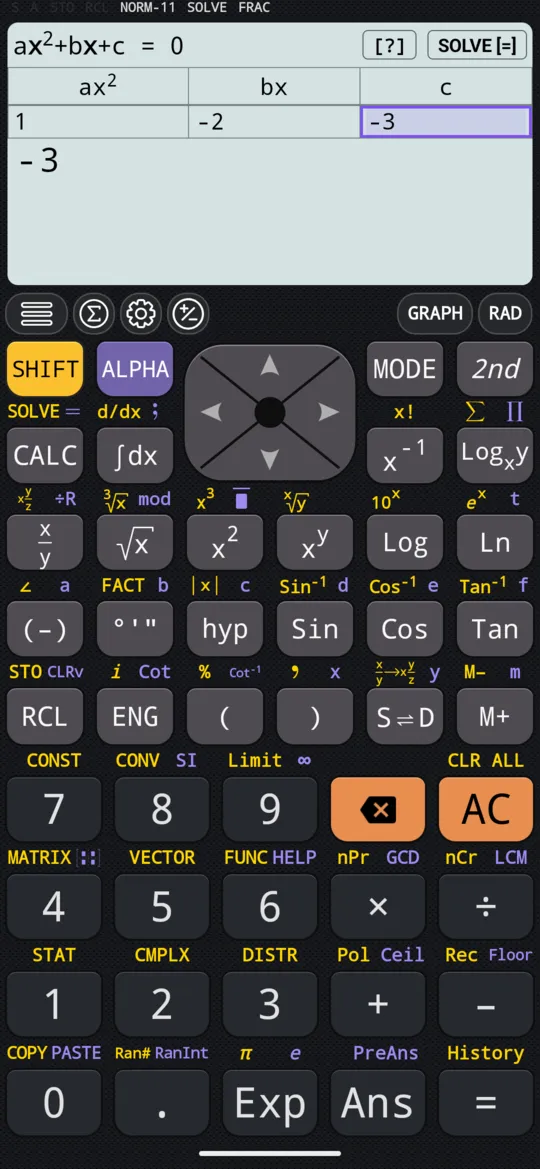
Type b and press =, then c and press =. Enter 0 for a term the equation leaves out.
-
Press = again, or tap SOLVE [=], and x1 appears.
-
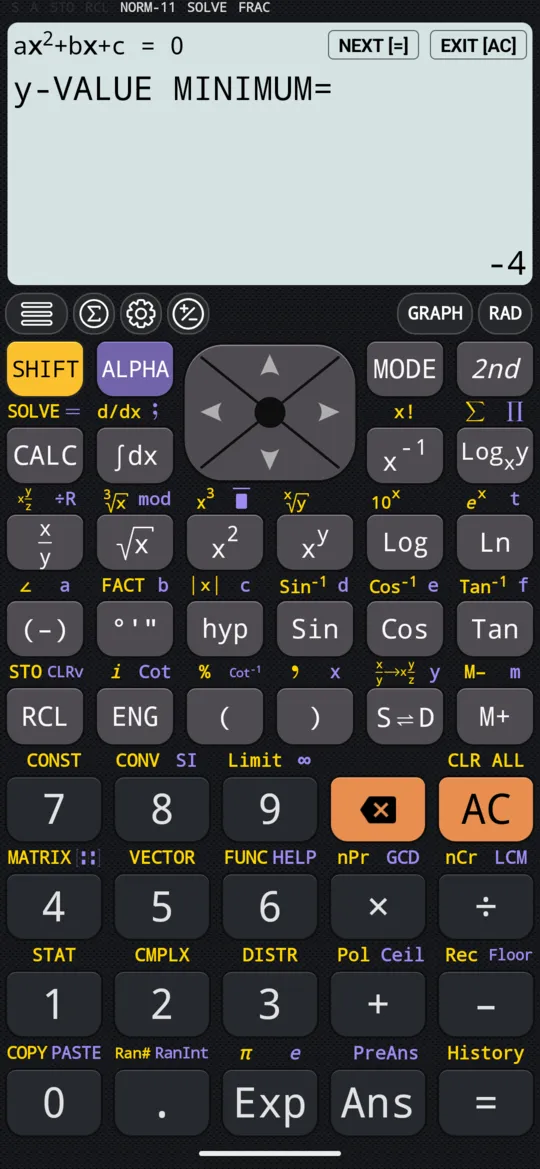
Press = to step on, or tap NEXT [=]: x2, then the x and y values of the vertex. After the last, the editor comes back with your coefficients, ready to change and solve again.
x² - 2x - 3 = 0
| a | b | c |
|---|---|---|
| 1 | -2 | -3 |
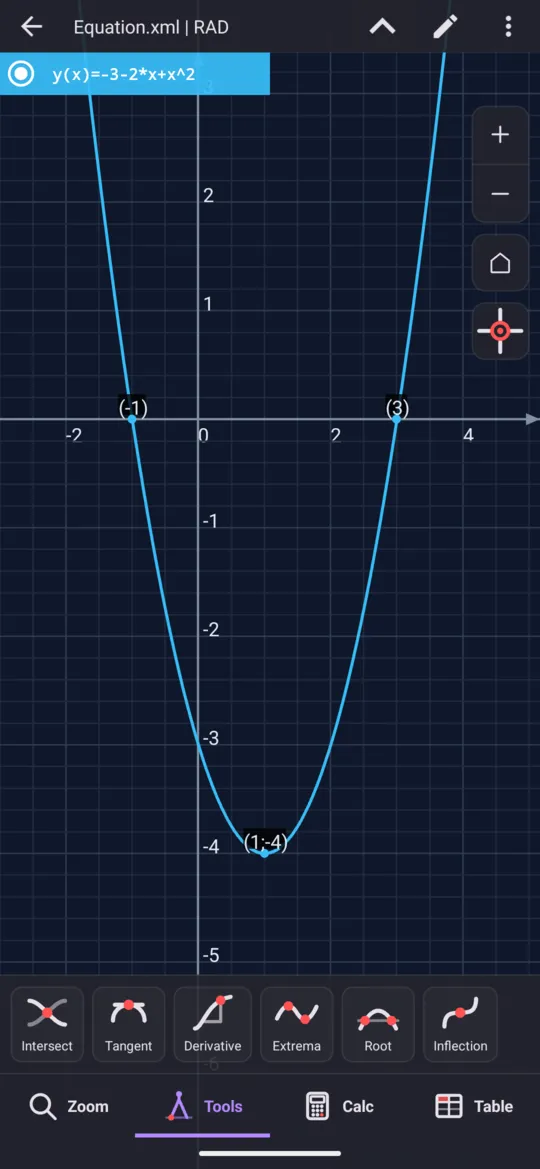
out x1= -1
x2= 3
x-VALUE MINIMUM= 1
y-VALUE MINIMUM= -4
On the phone the four answers come one press of = at a time. A coefficient can be a whole expression, a fraction or √2, and = works it out before moving on.
The vertex: a minimum or a maximum
The last two answers are the vertex of the parabola y = ax² + bx + c, its turning point, and the sign of a decides what the calculator calls it.
- a > 0. The parabola opens upward, so the vertex is its lowest point: the steps read x-VALUE MINIMUM and y-VALUE MINIMUM.
- a < 0. The parabola opens downward, and the same two steps read x-VALUE MAXIMUM and y-VALUE MAXIMUM.
The y value is the minimum or maximum value of the quadratic itself, which is what a question about the least or greatest value is asking for.
Complex roots
When the discriminant b² − 4ac is negative the parabola never meets the x-axis, and there are no real roots. The calculator does not stop there: x1 and x2 come back as a complex conjugate pair, and the vertex follows as usual.
x² + 1 = 0
| a | b | c |
|---|---|---|
| 1 | 0 | 1 |
out x1= -i
x2= i
x-VALUE MINIMUM= 0
y-VALUE MINIMUM= 1
Roots kept in X and Y
Solving copies the roots into the calculator's variables, so a later calculation can use them without retyping.
- X holds the first root, x1, and Y the second, x2. Complex roots are stored too: after x² + 1 = 0, X = −i and Y = i.
- The vertex is only displayed. Note it down if you need it later.
- When a = 0 there is only one root, so only X is set.
- After No solution or Infinite solution nothing is stored, and X and Y keep whatever they held.
Of the polynomial modes, this is the only one that stores its answers: the roots of a cubic, a quartic or a quintic are displayed and nothing more.
When a is 0
With a = 0 the equation is no longer quadratic, and the calculator notices.
- b is not 0. The equation is linear, bx + c = 0, with the single root x = −c/b. It comes back as one value labelled x, with no second root and no vertex: a = 0, b = 2, c = 4 gives x = −2.
- b is 0 and c is not. The equation reduces to c = 0, which is impossible, and a dialog reads No solution. a = 0, b = 0, c = 5 is one.
- All three are 0. The equation reduces to 0 = 0, which every x satisfies, and the dialog reads Infinite solution.
OK on either dialog returns to the editor.
See it on a graph
Press GRAPH at any time, while typing the coefficients or with an answer on screen, and the calculator plots y = ax² + bx + c from the coefficients in the editor. The roots and the vertex are already marked; each marker can be switched off from the graph screen's own controls.
At a glance
| Key | What it does |
|---|---|
| MODE | Choose Solve polynomial of degree 2 |
| = | Evaluates a cell and moves on; once a, b and c are in, solves; then steps through x1, x2 and the vertex, and back to the editor |
| left right | Move between the cells |
| AC | Empties all three cells and starts over |
| GRAPH | Plots the parabola with its roots and vertex marked |
Tap any answer to switch it between a fraction and a decimal. For an equation that is not in the form ax² + bx + c = 0, or one with letters in it, SOLVE takes it as typed; for three, four or five roots, see cubic, quartic and quintic equations.
Questions
Does it give the vertex as well as the roots?
Yes. After x1 and x2, the next two presses of = show the x and y values of the vertex, labelled x-VALUE MINIMUM and y-VALUE MINIMUM when a is positive and the parabola opens upward, or x-VALUE MAXIMUM and y-VALUE MAXIMUM when a is negative. For x² − 2x − 3 = 0 the vertex is a minimum at x = 1, y = −4.
What if the discriminant is negative?
Then the two roots are a complex conjugate pair, and the calculator gives them as such rather than stopping. x² + 1 = 0 gives x1 = −i and x2 = i, followed by its vertex, a minimum at x = 0, y = 1.
Where are the roots stored?
x1 goes into the variable X and x2 into Y, complex roots included, so they can go straight into another calculation. The vertex is only displayed. When a is 0 only X is set, and when the answer is No solution or Infinite solution nothing is stored, so X and Y keep what they held.
What happens if a is 0?
The equation is linear, bx + c = 0, and the calculator solves it as one: a single root labelled x, with no second root and no vertex. a = 0, b = 2, c = 4 gives x = −2. If b is 0 too, the answer is No solution, or Infinite solution when c is also 0.
Related pages
- Solve cubic, quartic and quintic equations, including complex roots three, four or five roots, complex ones included
- Solve polynomial inequalities of degree 2, 3 and 4 the solution set as intervals, and the shaded graph
- SOLVE every root at once, exact, and formulas rearranged
- Graphing and tables curves, shaded areas, tables of values
Written from the calculator's own manual and from the app itself, version 7.6.0; every figure is one the manual shows or a capture of the app proves. Last revised on 26 September 2026.
Bug reports and feature requests go to kimcuc@samatica.com — a person reads it.