Solve simultaneous linear equations in 2, 3 or 4 unknowns in Scientific calculator plus 991 for Android
Press MODE and choose Solve system of equations with 2, 3 or 4 unknowns. Each equation is a row of the grid: its coefficients, then the constant from the right-hand side. Press = after each value, then = again, and the unknowns come one at a time, x, then y, z and t, and are stored in X, Y, Z and T.
- Modes
- Solve system of equations with 2, 3 or 4 unknowns
- The grid
- one row per equation; the last column is the right-hand side
- Unknowns
- x, y, z and t (not w)
- Stored
- in X, Y, Z and T
A system of linear equations goes in as a grid of numbers: one row for each equation, one column for each unknown, and one more column for the constant on the right-hand side. Nothing else about the equations is typed.
Solve it
To solve three simultaneous equations
-
Press MODE and choose Solve system of equations with 3 unknowns. The Coefficient Editor appears: three rows and four columns, a, b, c and d.
-
Write each equation as ax + by + cz = d. In the first row, type the coefficients of x, y and z and then the constant, pressing = after each: the selection moves along the row and on to the next.
-
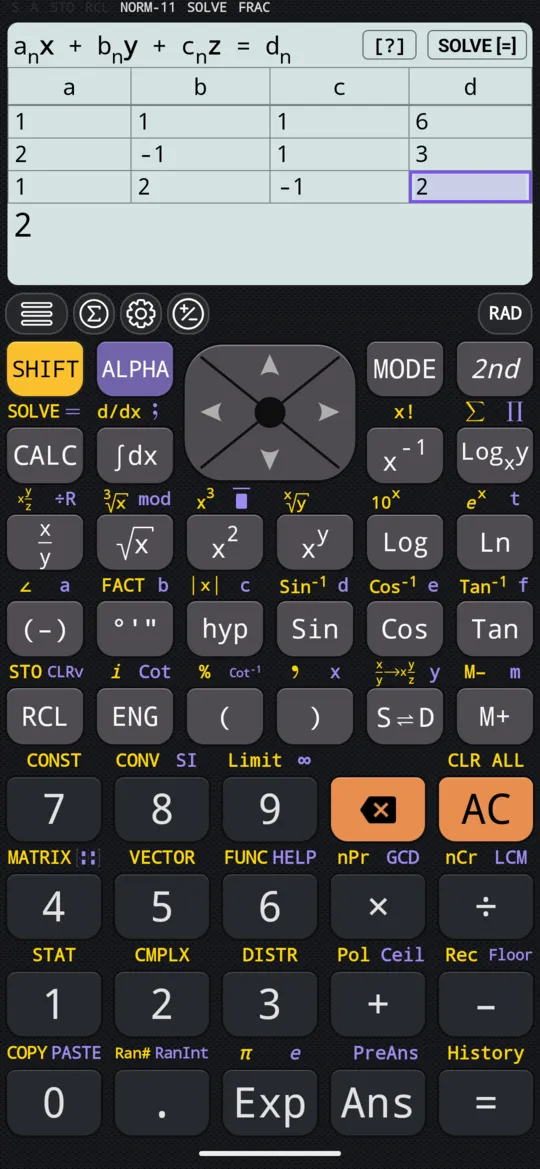
Fill the second and third rows the same way, with 0 for an unknown an equation leaves out.
-
Press = again, or tap SOLVE [=], and x appears.
-
Press =, or tap NEXT [=], for y and again for z. After the last, the editor comes back with your coefficients.
[x + y + z = 6; 2x - y + z = 3; x + 2y - z = 2]
| a | b | c | d |
|---|---|---|---|
| 1 | 1 | 1 | 6 |
| 2 | -1 | 1 | 3 |
| 1 | 2 | -1 | 2 |
out x= 1
y= 2
z= 3
Two, three or four unknowns
The mode sets the size of the grid, always one more column than there are unknowns.
| Mode | Each row is read as | Grid |
|---|---|---|
| 2 unknowns | ax + by = c | 2 rows, columns a to c |
| 3 unknowns | ax + by + cz = d | 3 rows, columns a to d |
| 4 unknowns | ax + by + cz + dt = e | 4 rows, columns a to e |
The fourth unknown is called t, not w.
[x + y = 3; x - y = 1]
| a | b | c |
|---|---|---|
| 1 | 1 | 3 |
| 1 | -1 | 1 |
out x= 2
y= 1
[x + y + z + t = 10; x - y + z - t = -4; x + y - z - t = 0; x - y - z + t = 2]
| a | b | c | d | e |
|---|---|---|---|---|
| 1 | 1 | 1 | 1 | 10 |
| 1 | -1 | 1 | -1 | -4 |
| 1 | 1 | -1 | -1 | 0 |
| 1 | -1 | -1 | 1 | 2 |
out x= 2
y= 3
z= 1
t= 4
Moving around the grid
- = evaluates the cell and moves the selection on to the next.
- left right up down move to any cell, to correct one without retyping the rest.
- A cell takes a whole expression, a fraction or √2, and complex numbers too.
- AC empties every cell and returns the selection to the first.
Tap an answer to switch it between a fraction and a decimal.
Answers kept in X, Y, Z and T
The solved values are stored in the variables of the same names, X, Y, Z and T, as many as the mode has unknowns, so they can go straight into another calculation.
When there is no single answer
Not every system has exactly one solution, and the calculator names the two other cases instead of returning numbers.
- Infinite solution: the equations are dependent, one a multiple of another or the sum of two others, so infinitely many sets of values satisfy them. x + y = 2 and 2x + 2y = 4 describe the same line; x + y + z = 3, 2x + 2y + 2z = 6 and 3x + 3y + 3z = 9 the same plane.
- No solution: the equations contradict each other, so nothing satisfies them all. x + y = 1 and x + y = 2 are parallel lines that never meet; x + y + z = 1, x + y + z = 2 and x + y + z = 3 are parallel planes.
OK returns to the editor.
At a glance
| Key | What it does |
|---|---|
| MODE | Choose Solve system of equations with 2 unknowns, 3 or 4 |
| = | Evaluates a cell and moves on; once the grid is full, solves; then steps through the unknowns, and back to the editor |
| left right | Move along a row |
| up down | Move between the rows |
| AC | Empties the grid and starts over |
Only linear equations go into this grid. An equation with a square or a product of unknowns in it goes to SOLVE, one equation at a time.
Questions
How do I enter a system of equations?
Write each equation with the unknowns in order on the left and the constant on the right, as in 2x − y + z = 3. Each becomes one row of the grid: the coefficients of x, y and z, then the constant, pressing = after each. Enter 0 for an unknown the equation leaves out.
Why is the fourth unknown called t?
Because that is what the calculator names it: with four unknowns the solver reads each row as ax + by + cz + dt = e, and shows the answers as x, y, z and t. The value of t is stored in the variable T.
What does Infinite solution mean for a system?
That the equations are dependent: one says nothing the others do not, so infinitely many sets of values satisfy them all. x + y = 2 and 2x + 2y = 4 is one example, the same equation scaled by 2. When the equations contradict each other, as x + y = 1 and x + y = 2 do, the answer is No solution.
Can the coefficients be fractions?
Yes. A cell takes a whole expression, a fraction, √2 or a complex number, and = works it out before moving on. The answers can be switched between fractions and decimals with a tap.
Related pages
- Solve a quadratic equation both roots, the vertex, complex roots and the graph
- SOLVE every root at once, exact, and formulas rearranged
- Matrices and vectors which way in, and what each page of the chapter covers
Written from the calculator's own manual and from the app itself, version 7.6.0; every figure is one the manual shows or a capture of the app proves. Last revised on 26 September 2026.
Bug reports and feature requests go to kimcuc@samatica.com — a person reads it.