SOLVE: solve an equation as typed, or a formula for any variable in Scientific calculator plus 991 for Android
Type the equation on the input line, with ALPHA then CALC for its = sign, and press SHIFT then CALC. SOLVE returns every root it finds at once, one to a line and exact wherever it can: x² + 2 − 1/x = 4 gives x = −1, x = 1/2 − √5/2 and x = 1/2 + √5/2. Letters other than the unknown stay in the answer, so a formula comes back rearranged.
- Keys
- SHIFT CALC (SOLVE); ALPHA CALC types =
- Takes
- an equation, or an expression solved against 0
- Unknown
- x, or the one you name after a comma (SHIFT ))
- Gives
- every root it finds, one per line, exact or decimal
The equation modes want coefficients. SOLVE wants the equation itself, typed on the ordinary input line exactly as it is written, and it answers with all its roots at once instead of one per press. It also works with letters: other variables stay in the answer, which makes it the tool for rearranging a formula.
Solve an equation
SOLVE is the shifted function of the CALC key, and the = inside the equation is its ALPHA function.
To solve an equation
-
Type the equation on the input line, both sides. The = sign is ALPHA CALC =, x is ALPHA ) x and y is ALPHA S⇌D y.
-
Press SHIFT CALC SOLVE.
-
Read the roots. They arrive together in one bracketed list, one to a line, each written as the unknown, =, and its value.
in x² + 2 - 1/x = 4
out [x = -1; x = 1/2 - √5/2; x = 1/2 + √5/2]
What it accepts
- An equation with x in it, such as y = x + 5, x = sin(a) or x + 3 = b + c.
- An equation with other letters too. They are carried into the answer instead of being solved for.
- An equation, a comma and a variable name, to solve for that variable instead of x.
- An expression on its own, which is solved against 0: x² + 2x − 2 is solved as x² + 2x − 2 = 0.
Rearrange a formula
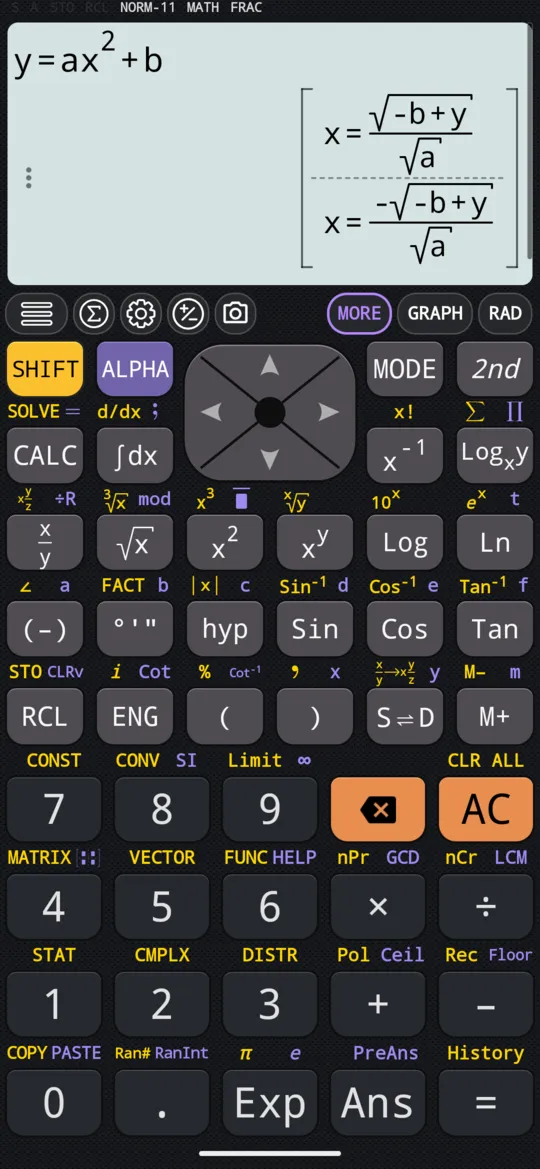
Because the letters that are not the unknown stay letters, SOLVE rearranges a formula. Here a, b and y are ordinary variables, and x is solved for.
in y = ax² + b
out [x = √(-b + y)/√a; x = -√(-b + y)/√a]
Typed as ALPHA S⇌D for y, ALPHA CALC for =, ALPHA (-) for a, ALPHA ) for x, then x², +, and ALPHA °'" for b.
Choose the unknown
SOLVE solves for x whenever the equation contains x, and for the only other variable when it does not. To choose the unknown yourself, end the equation with a comma and the name of the variable. The comma is SHIFT ).
in y + 2 = x, y
out [y = -2 + x]
Without the comma and y, SOLVE would have solved this for x.
Exact roots or decimals
With the roots on screen, S⇌D switches the whole list between the exact form and decimals, rewriting it in place. The three roots above become:
out [x = -1; x = -0.61803398875; x = 1.61803398875]
Roots that still contain letters, like those of y = ax² + b, read the same either way: there is nothing in them to turn into a decimal.
Complex roots
An equation with no real root does not defeat SOLVE: it returns the complex roots instead.
in x² + 1 = 0
out [x = -i; x = i]
When SOLVE cannot solve
Some equations have no solution at all. Whatever x is, the two sides of x + 1 = x + 2 differ by 1, and instead of a list the answer line says so:
in x + 1 = x + 2
out Cannot solve equation
The same message appears in two other cases:
- the equation has no root SOLVE can find, as with 1/x = 0 or √x = −1;
- CAS mode is turned off in settings. It is on to begin with; with it off, a symbolic answer such as the rearranged formula above cannot be produced.
SOLVE with the other tools
- Stationary points. Take the derivative as an expression and give it to SOLVE on its own: an expression is solved against 0, so the roots are where the curve levels off.
- Polynomials. For a polynomial of degree 2 to 5 the equation modes take just the coefficients, and the quadratic one also gives the vertex.
- Factors. To write a polynomial as a product instead of finding its roots, use FACTOR.
At a glance
| Key | What it does |
|---|---|
| SHIFT CALC SOLVE | Solves the equation or expression on the input line |
| ALPHA CALC = | Types the = between the two sides |
| SHIFT ) , | Types the comma before the name of the unknown |
| ALPHA ) x | Types x |
| ALPHA S⇌D y | Types y |
| S⇌D | Switches the roots between exact form and decimals |
Questions
How do I solve an equation for x?
Type it on the input line, both sides, with ALPHA then CALC for the = sign and ALPHA then ) for x. Then press SHIFT then CALC. The roots come back together in one list: x² + 2 − 1/x = 4 gives x = −1, x = 1/2 − √5/2 and x = 1/2 + √5/2.
How do I solve a formula for another variable?
End the equation with a comma, SHIFT then ), and the name of the variable. y + 2 = x, y solves for y and gives y = −2 + x; without the comma SOLVE would solve for x. The other letters stay in the answer as letters.
How do I get decimals instead of square roots?
Press S⇌D with the roots on screen. The whole list switches between the exact form and decimals, so x = 1/2 − √5/2 becomes x = −0.61803398875. Roots that still contain letters read the same either way.
Why does it say Cannot solve equation?
Either the equation has no solution at all, as x + 1 = x + 2, or it has no root SOLVE can find, as 1/x = 0 or √x = −1, or CAS mode has been turned off in settings. An equation with no real root is not one of these: SOLVE returns its complex roots instead.
Related pages
- Solve a quadratic equation both roots, the vertex, complex roots and the graph
- Solve cubic, quartic and quintic equations, including complex roots three, four or five roots, complex ones included
- Factor, expand and simplify algebraic expressions FACTOR, EXPAND and SIMPLY on the 2nd keyboard
- Derivatives the slope at a point, or the derivative as an expression, with the graph
Written from the calculator's own manual and from the app itself, version 7.6.0; every figure is one the manual shows or a capture of the app proves. Last revised on 26 September 2026.
Bug reports and feature requests go to kimcuc@samatica.com — a person reads it.