Derivatives: the slope at a point, or the derivative as an expression in Scientific calculator plus 991 for Android
Press SHIFT then ∫dx to open the derivative menu. Derivative at a point gives the slope as a number, so x³ + x² at x = 2 comes back as 16; Derivative gives the slope written out as an expression in x, so x³ comes back as 3x², ready to be used again. The first follows the angle unit and the second always works in radian, which is how sin(x) can seem to disagree with itself.
- Keys
- SHIFT ∫dx (d/dx) opens the derivative menu
- Two entries
- Derivative at a point, a number; Derivative, an expression in x
- Second keyboard
- Derivative has a key of its own
- Angle unit
- at a point it follows the setting; as an expression, always radian
A derivative measures how steeply an expression changes as x changes: the slope of its curve. The calculator offers it in two ways, and the two differ in more than the shape of the answer. This page takes each from the menu to the answer, then covers the angle unit, answers left untidy, second derivatives and the graph.
Two entries under d/dx
The derivative menu is the shifted function of the integral key: SHIFT ∫dx d/dx. It holds two entries, and they answer different questions.
- Derivative at a point gives a number: the slope of f(x) at one value of x.
- Derivative gives a function back: the slope written as an expression in x, which you can then use anywhere.
On screen the menu shows each entry as its template with a line under it: d/dx[f(x)] at x = a for Derivative at a point, then d/dx[f(x)] for Derivative.
![The derivative menu, open below the top two rows of keys: d/dx[f(x)] at x = a, which computes the derivative at x = a, then d/dx[f(x)], which computes the derivative of f(x).](/_astro/derivative-menu.DAmuSl0S_z6TNC.webp)
Derivative is also on the second keyboard, the one 2nd opens, where it has a key of its own: one press instead of a trip through the menu. Pressed without SHIFT, the same ∫dx key opens the integral menu instead.
Radian or Degree
The two entries treat the angle unit differently, which matters as soon as a trigonometric function is involved.
Find the slope at a point
Choose Derivative at a point and the template arrives with three empty slots: the expression, the variable and the point.
To find the slope at a point
-
Press SHIFT ∫dx d/dx and choose Derivative at a point. The template appears with three empty slots.
-
Type the expression in the first slot.
-
Move between the slots with left right , or tap one. The variable slot already holds x: change it only if you differentiate with respect to something else.
-
Fill in the point, then press =.
in d/dx[x³ + x²] x=2
out 16
By hand the derivative is 3x² + 2x, which at x = 2 gives 12 + 4 = 16.
More slopes
The sine curve leaves the origin at 45°, so in Radian its slope there is exactly 1. In Degree the same entry gives π/180, for the reason in the callout above.
in d/dx[Sin(x)] x=0
out 1
in d/dx[Sin(x)] x=0
out π/180
in d/dx[x²] x=3
out 6
That is 2 × 3.
The derivative as an expression
Choose Derivative instead and there is no point to fill in. The template has two slots, the expression and the variable, and the answer is a function of x rather than a number.
To differentiate an expression
-
Press SHIFT ∫dx d/dx and choose Derivative, or press its own key on the second keyboard. The template appears with two slots.
-
Type the expression in the first slot. The variable slot already holds x.
-
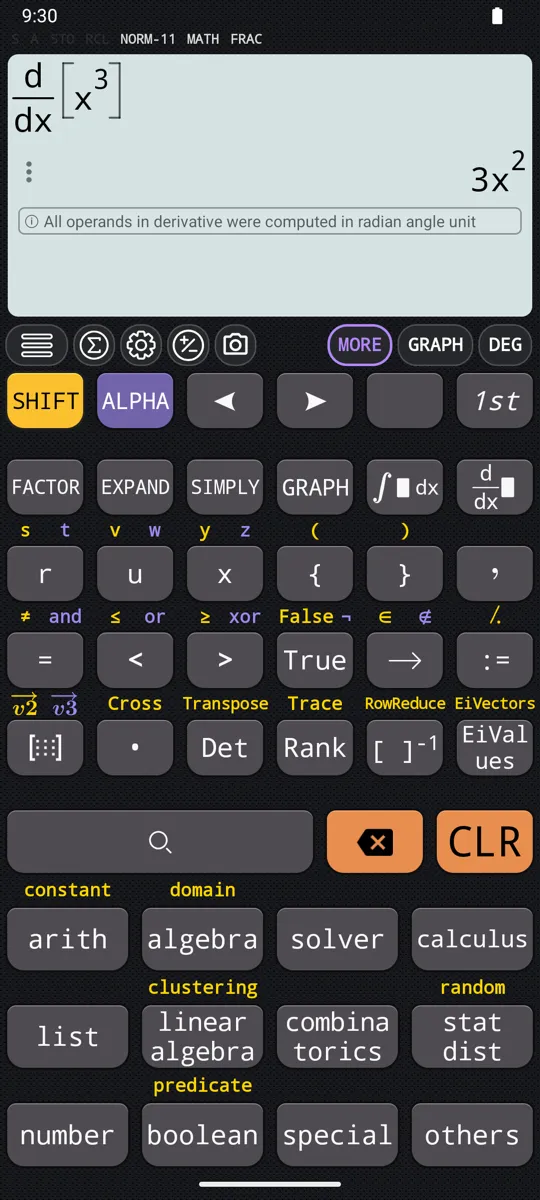
Press =. The derivative appears under the template, as an expression in x.
in d/dx[x³]
out 3x²
in d/dx[√x]
out 1/(2√x)
The answer is written as a fraction, not as a negative power.
in d/dx[Ln(x)]
out 1/x
in d/dx[Sin(x)]
out Cos(x)
This entry always works in radian, so the answer is the same in every mode.
The product rule, and answers left untidy
The answer is not always in the form you would write by hand.
in d/dx[Sin(x)Cos(x)]
out Cos(x)² - Sin(x)²
in d/dx[eˣSin(x)]
out eˣCos(x) + eˣSin(x)
To tidy an answer, press 2nd SIMPLY on it.
A second derivative
The Derivative template has two slots, the expression and the variable, and none for the order. To differentiate twice, run Derivative on its own answer.
Which entry to use
Use Derivative at a point when the question asks for a slope, a rate or a gradient at one particular value. Use Derivative when you need the derivative itself: to find stationary points, to differentiate twice, or to carry the expression into another calculation.
For stationary points, take the derivative to the SOLVE key: an expression on its own is solved against zero, so solving the derivative gives the values of x where the curve levels off.
| Derivative at a point | Derivative | |
|---|---|---|
| Gives | A number: the slope at one value of x | An expression in x |
| Slots | Expression, variable, point | Expression, variable |
| Angle unit | Follows the setting | Always radian |
| Use it for | A slope, a rate or a gradient at one value | Stationary points, a second derivative, another calculation |
| GRAPH draws | f(x), f'(x) dashed, both values marked | The same two curves, nothing marked |
See the slope on a graph
Either entry can be drawn instead of evaluated. Type it on the calculation screen exactly as you would to evaluate it, then press GRAPH. The graph screen itself has a page of its own.
Derivative at a point draws four things at once. For x³ + x² at x = 2:
- f(x), the expression itself, drawn solid.
- f'(x), its derivative, drawn dashed and in a colour of its own: here 3x² + 2x.
- A point on f'(x) at the chosen value, marked (2;16) and listed above the graph as f'(2)=16. It is the answer the calculation screen gives.
- A point on f(x) at the same value, marked (2;12) and listed as f(2)=12, showing where on the curve that slope was measured. Each point takes the colour of the curve it sits on.
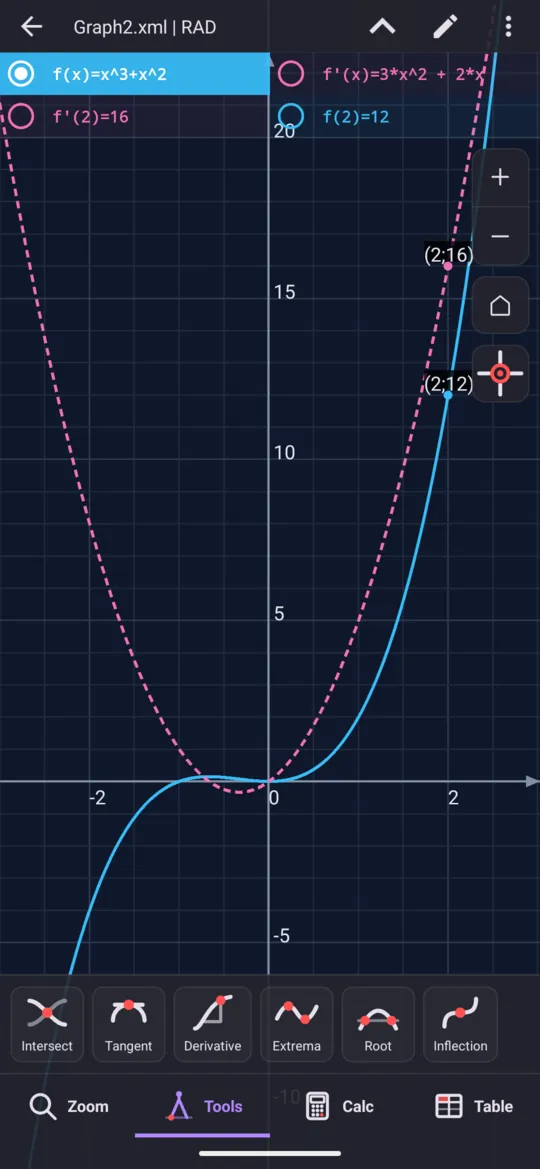
Here are the two curves of that drawing, one at a time, on the axes the calculator uses.
Reading the two curves together is the point of the drawing: wherever the dashed curve crosses zero the solid one has a peak or a trough, and where the dashed curve is high the solid one is climbing steeply.
Derivative draws the same pair of curves without the two points, since it names no particular value to mark. For 1/x the curve is drawn solid and its derivative, −1/x², dashed. Use it to see the shape of a derivative over a whole interval rather than its value at one point: where it is positive the curve rises, and where it is negative the curve falls.
At a glance
| Key or entry | What it does |
|---|---|
| SHIFT ∫dx d/dx | Opens the derivative menu |
| Derivative at a point | The slope at one value: expression, variable, point |
| Derivative | The derivative as an expression: expression, variable |
| left right | Move between the slots of the template |
| = | Evaluates |
| 2nd SIMPLY | Tidies an untidy answer |
| GRAPH | Draws f(x) solid and f'(x) dashed; at a point, marks both values |
| ∫dx | The integral menu instead |
Questions
How do I find the derivative at a point on a calculator?
Press SHIFT then ∫dx to open the derivative menu and choose Derivative at a point. Type the expression in the first slot, leave x in the variable slot, fill in the point and press =. The slope of x³ + x² at x = 2 comes back as 16.
Why does the slope of sin(x) at 0 come out as π/180?
Because the angle unit is set to Degree. Derivative at a point follows the angle unit, so the slope of sin(x) at x = 0 is 1 in Radian and π/180 in Degree: the chain rule applied to the conversion. Derivative, the entry that returns an expression, always works in radian, gives cos(x) in every mode, and prints a note under the answer when the setting is not Radian.
Can it find a second derivative?
Yes, in two passes. The Derivative template has two slots, the expression and the variable, and none for the order, so run Derivative on its own answer.
Why is the answer not in the form I would write by hand?
The calculator applies the rules of differentiation but does not tidy up afterwards. The product rule on sin(x)·cos(x) is left as cos(x)² − sin(x)² rather than folded into cos(2x); both are the same function. To tidy an answer, press 2nd then SIMPLY on it.
Can I see the derivative on a graph?
Yes. Type the derivative on the calculation screen exactly as you would to evaluate it, then press GRAPH. The expression is drawn solid and its derivative dashed. Derivative at a point also marks the chosen value on both curves: for x³ + x² at x = 2, f(2)=12 on the solid curve and f'(2)=16 on the dashed one.
Related pages
- Definite integrals and antiderivatives a number or a function, with the area shaded on the graph
- Limits two-sided, one-sided and at infinity, with the graph
- Calculus integrals, derivatives, limits, sums and products, and the angle unit
- Graphing and tables curves, shaded areas, tables of values
Written from the calculator's own manual and from the app itself, version 7.6.0; every figure is one the manual shows or a capture of the app proves. Last revised on 25 September 2026.
Bug reports and feature requests go to kimcuc@samatica.com — a person reads it.