Definite integrals and antiderivatives in Scientific calculator plus 991 for Android
Press ∫dx, choose Integral, fill in the expression and the two limits, and press =. Integral gives an exact answer wherever it can find one: the area under x² from 1 to 2 comes back as the fraction 7/3, not as a decimal. Choose Antiderivative instead and a function comes back, x³/3 for x², without the + C.
- Keys
- ∫dx (the integral menu); SHIFT ∫dx for d/dx
- Two answers
- Integral, a number; Antiderivative, a function
- Angle unit
- Integral follows it; Antiderivative is always radian
- Numerical methods
- LegendreGauss, Romberg, Gauss-Kronrod
An integral on this calculator is one of two things. A definite integral is a number, the area under f(x) between two limits; an antiderivative is a function, one whose derivative is f(x). Both start from the same key. This page works a definite integral from the menu to the answer, then covers the answers that are not plain numbers, the graph, the antiderivative and the three fast numerical methods.
One key, two answers
Press ∫dx to open the integral menu. Its first two entries are the integrals themselves, and they answer different questions:
- Integral gives a number: the integral of f(x) with respect to x from a to b, which is the area under f(x) between the two limits.
- Antiderivative gives a function back: one whose derivative is f(x). There are no limits to fill in.
The three entries after them, LegendreGauss Integral, Romberg Integral and Gauss-Kronrod Integral, work out the same kind of integral by a numerical rule, and have a section of their own below. The key's shifted function, SHIFT ∫dx d/dx, opens the derivative menu instead.
Set the angle unit first
The integral follows the angle unit, and so do the three fast methods, which matters as soon as anything trigonometric is inside it. Integrating sin(x) from 0 to π gives 2 in Radian, the area under one arch of the sine curve. In Degree the same input asks for the area between 0° and about 3.14°, a sliver near the origin, and the answer is about 0.0861.
So check the unit before you integrate. Press the DEG, RAD or GRA key at the top of the display to switch among the units; the same setting is under Settings → Calculation.
Work out a definite integral
Integral arrives as a template with four empty slots: the expression, the variable, the lower limit a and the upper limit b.
To work out a definite integral
-
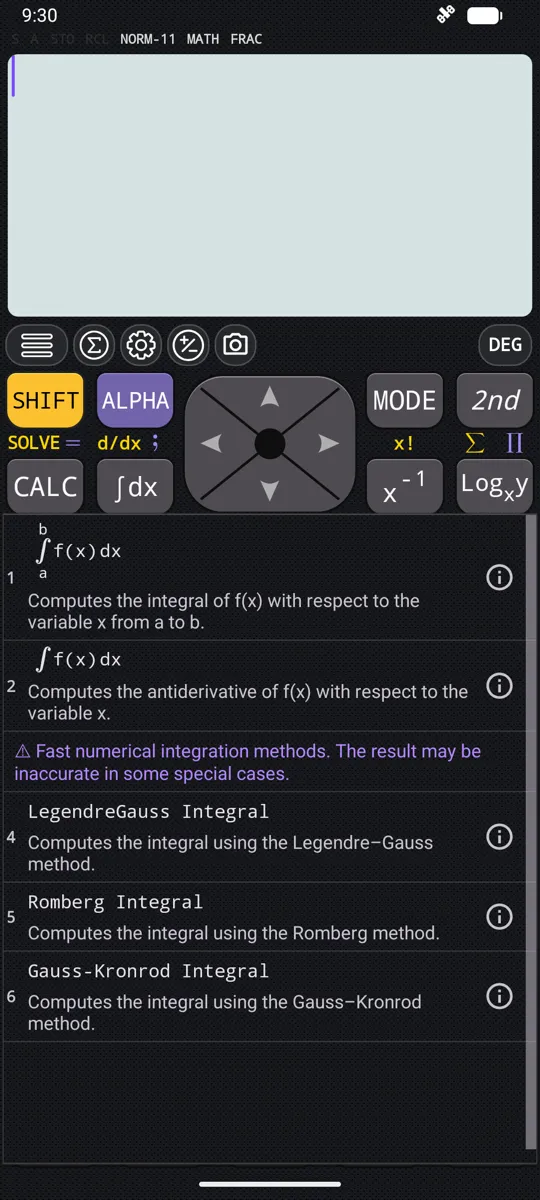
Press ∫dx. The integral menu opens.
-
Choose Integral, the first entry. The template appears with four empty slots.
-
Type the expression in the first slot.
-
Move between the slots with left right , or tap one. The variable slot already holds x: change it only if you integrate with respect to something else.
-
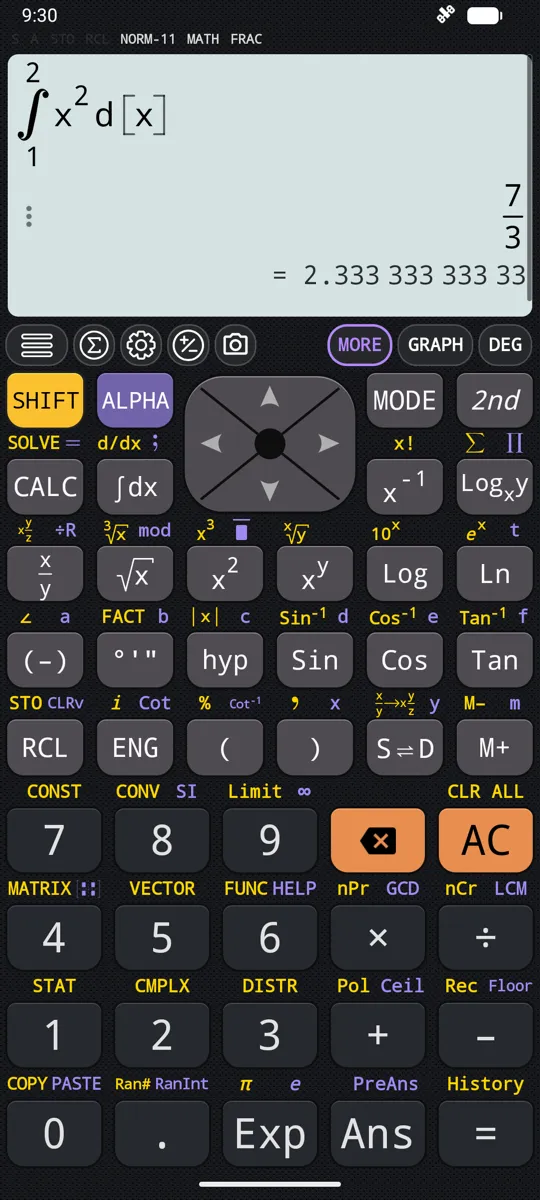
Fill in the lower limit a and the upper limit b, then press =. The answer appears on the right, under the integral.
in ∫ 1…2 x² dx
out 7/3
The answer is kept as the exact fraction 7/3 rather than 2.333…
in ∫ 0…π Sin(x) dx
out 2
In Radian. π is SHIFT Exp π.
Limits that are not whole numbers
The limits a and b do not have to be whole numbers.
in ∫ 1…e 1/x dx
out 1
Exactly 1.
When the answer is a special function
Some integrals have no answer in elementary functions. For those the calculator answers with the special function it needs rather than a decimal.
in ∫ 0…1 e^(-x²) dx
out (√πErf(1))/2
Tap the result to see it as a decimal instead.
When there is no answer
An integral the calculator cannot evaluate reports an error rather than guessing. The usual cause is that the integral does not converge: the integrand runs to infinity somewhere between the limits.
Integrating 1/x from 0 to π is one of these. 1/x has no finite area next to 0, so there is nothing to return. Before you integrate, check that the integrand stays finite across the whole interval, the limits included.
See the area on a graph
An integral can be drawn instead of evaluated. Type it exactly as you would to evaluate it, then press GRAPH: the curve is plotted, the region between the two limits is shaded, and both limits are marked on the x-axis. The shaded region is the answer. The graph screen itself has a page of its own.
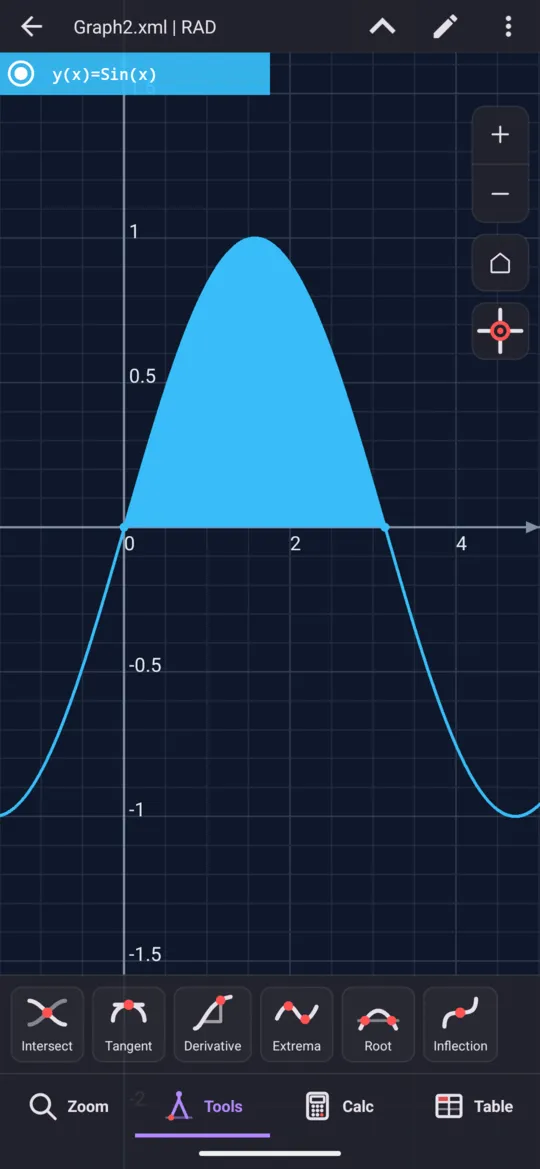
Seeing the region also explains a sign that looks wrong. Area below the x-axis counts as negative, so an integral across a hump and a dip returns the difference between them, not the total ink on the page.
Antiderivatives, or indefinite integrals
Antiderivative, the second entry in the integral menu, gives a function back: one whose derivative is the expression you typed. Its template has two slots, the expression and the variable, and no limits. Type the expression and press =. On the 2nd keyboard the same thing has a key of its own, one press instead of a trip through the menu.
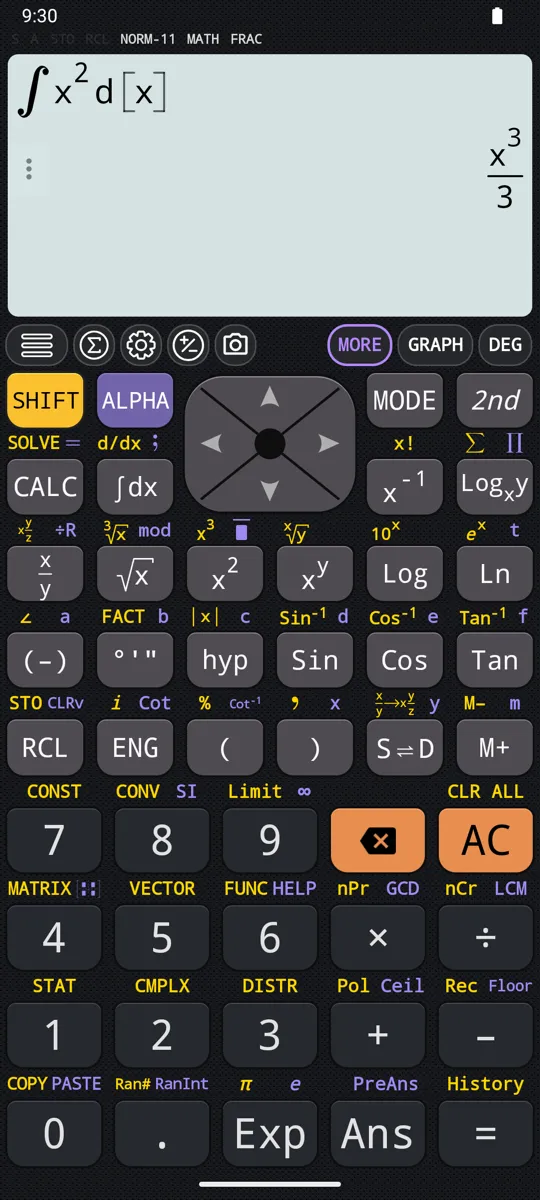
in ∫ x² dx
out x³/3
in ∫ Cos(x) dx
out Sin(x)
in ∫ 1/x dx
out Ln(x)
The fast numerical methods
The last three entries in the menu integrate by a named numerical rule instead of looking for an exact answer. They take the same four slots as Integral, and follow the angle unit as it does:
- LegendreGauss Integral
- Romberg Integral
- Gauss-Kronrod Integral
They are worth reaching for when an integrand is heavy enough that Integral takes a noticeable time to answer.
in ∫ 0…π Sin(x) dx
out 2
For this one, Integral gives the same 2.
They always answer with a number. Integral gives an exact answer wherever it can find one, so the two can look different even when both are right.
At a glance
| Key or entry | What it does |
|---|---|
| ∫dx | Opens the integral menu |
| Integral | A number: four slots, expression, variable, lower limit, upper limit |
| Antiderivative | A function: two slots, expression and variable; one antiderivative, without the + C |
| LegendreGauss Integral, Romberg Integral, Gauss-Kronrod Integral | Fast numerical methods, with the same four slots as Integral |
| left right | Move between the slots of a template |
| = | Evaluates |
| GRAPH | Draws the curve, with the area between the limits shaded |
| DEG RAD GRA | Switches the angle unit, which Integral follows |
| SHIFT ∫dx d/dx | Opens the derivative menu instead |
Questions
Does it give an integral as an exact answer or a decimal?
Exact, wherever Integral can find one. The area under x² from 1 to 2 comes back as the fraction 7/3, not 2.333…, and 1/x from 1 to e as exactly 1. Where there is no answer in elementary functions the calculator names the special function it needs: e^(−x²) from 0 to 1 comes back as √π·Erf(1)/2, and tapping the result shows it as a decimal. The three fast numerical methods are the exception: they always answer with a number.
Why does sin(x) from 0 to π come out as about 0.0861 instead of 2?
Because the angle unit is set to Degree. The integral follows the angle unit, so in Degree the same input asks for the area between 0° and about 3.14°, a sliver near the origin, and the answer is about 0.0861. Switch to Radian with the DEG, RAD or GRA key at the top of the display and it comes back as 2, the area under one arch of the sine curve.
Why is there no + C on the antiderivative?
A function has infinitely many antiderivatives, and adding any constant to one gives another. The calculator returns a single one of them: x² comes back as x³/3, cos(x) as sin(x) and 1/x as ln(x). Put the + C back yourself when the answer has to stand for all of them.
Why does an integral give an error?
Because there is nothing to return. The calculator reports an error rather than guessing, and the usual cause is an integral that does not converge: the integrand runs to infinity somewhere between the limits. 1/x from 0 to π is one of these, since 1/x has no finite area next to 0. Check that the integrand stays finite across the whole interval, the limits included.
Why can a definite integral come out negative?
Because area below the x-axis counts as negative. An integral across a hump and a dip returns the difference between them, not the total area the curve encloses. Type the integral exactly as you would to evaluate it and press GRAPH, and the region between the two limits is drawn shaded, so you can see which parts lie below the axis.
Related pages
- Derivatives the slope at a point, or the derivative as an expression, with the graph
- Summation (∑) and product (∏), including infinite series ∑ and ∏ over a range of whole numbers, and infinite series
- Calculus integrals, derivatives, limits, sums and products, and the angle unit
- Graphing and tables curves, shaded areas, tables of values
Written from the calculator's own manual and from the app itself, version 7.6.0; every figure is one the manual shows or a capture of the app proves. Last revised on 25 September 2026.
Bug reports and feature requests go to kimcuc@samatica.com — a person reads it.