Summation (∑) and product (∏), including infinite series in Scientific calculator plus 991 for Android
Press SHIFT then logₓy for a summation, fill in the expression, the variable and the first and last values, and press =: x summed from 1 to 10 comes back as 55. Both ends of the range count, so 1 to 10 is ten terms, not nine. ALPHA then logₓy gives a product in the same four slots, and ∞ in the last slot sums a series that never ends, so 1/x² summed from 1 to ∞ comes back as π²/6.
- Keys
- SHIFT logₓy (∑); ALPHA logₓy (∏); ALPHA 9 types ∞
- Four slots
- expression, variable, first value, last value
- The range
- whole numbers, both ends included
- Angle unit
- both follow the setting
Summation adds up the values of an expression as a variable steps through a range of whole numbers; product multiplies them together instead. This page takes a sum from the key to the answer, then covers the sums that stay written out, series that never end, products, and the angle unit that both of them follow.
Add up a range
Summation and product sit on the same key, in its shifted and alphed positions: SHIFT logₓy ∑ for a sum, ALPHA logₓy ∏ for a product. Both templates arrive with the same four slots, in this order: the expression, the variable, the first value a and the last value b. The examples below write a filled template on one line, slot by slot, so ∑(x, x, 1, 10) is the sum of x as x runs from 1 to 10.
To add up a range of values
-
Press SHIFT logₓy ∑. The template appears with four empty slots.
-
Type the expression in the first slot. ALPHA ) x types x.
-
Move between the slots with left right , or tap one. The variable slot already holds x: change it only for a different variable.
-
Fill in the first value a and the last value b, then press = to evaluate.
in ∑ x=1…10 [x]
out 55
x takes the ten values 1, 2, 3 and so on up to 10, and the ten are added.
Any expression in x
The first slot takes any expression in the variable, not only the variable itself.
in ∑ x=1…4 [x²]
out 30
in ∑ x=1…10 [1/2ˣ]
out 1023/1024
The answer stays an exact fraction.
Sums that stay written out
Where the terms do not combine into anything simpler, the sum is written out term by term rather than turned into a decimal.
in ∑ x=1…3 [Sin(x)]
out Sin(1) + Sin(2) + Sin(3)
Infinite series
To sum a series that never ends, put ∞ in the last slot. ALPHA 9 ∞ types it.
in ∑ x=1…∞ [1/x²]
out π²/6
A famous result.
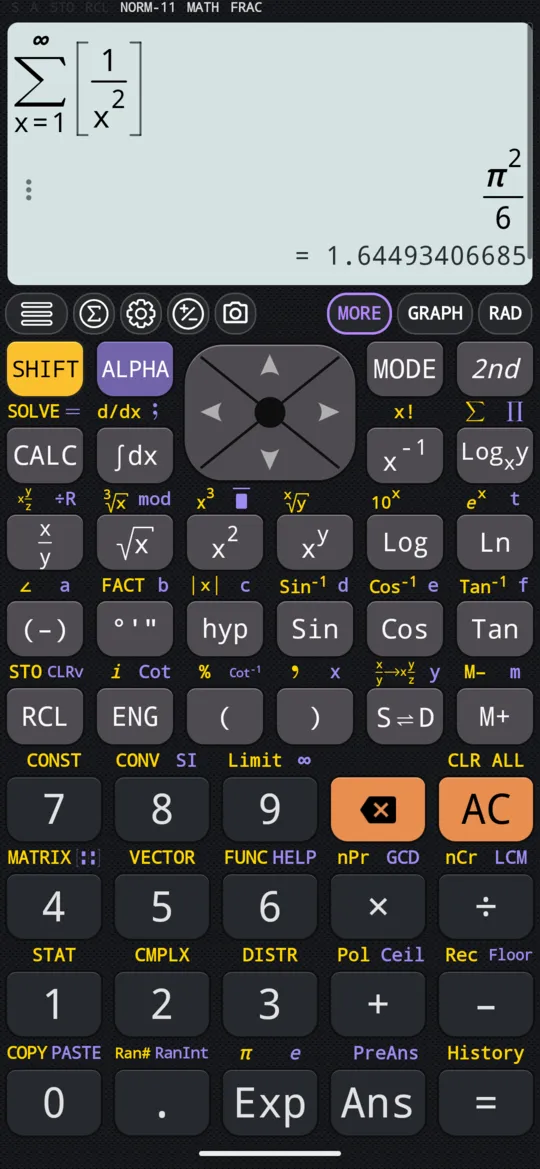
A series that grows without bound answers ∞ instead.
Products
ALPHA logₓy ∏ opens the product template. It fills in exactly like the sum, the same four slots in the same order, but the values are multiplied together instead of added.
in ∏ x=1…5 [x]
out 120
The whole numbers from 1 to 5, multiplied together.
in ∏ x=1…10 [x]
out 3628800
The same product taken up to 10: 3,628,800.
Factorial also has a key of its own, SHIFT x⁻¹ !, pressed after what it applies to.
The expression need not mention the variable at all.
in ∏ x=1…8 [2]
out 256
x runs through eight values and each contributes a 2, which gives 2⁸.
Degrees or radians
Summation and product both follow the angle unit, so a sum of sin(x) adds degrees in Degree mode and radians in Radian mode. Limits, by contrast, always work in radian, whatever the setting.
At a glance
| Key or entry | What it does |
|---|---|
| SHIFT logₓy ∑ | Opens the summation template |
| ALPHA logₓy ∏ | Opens the product template |
| ALPHA ) x | Types x |
| ALPHA 9 ∞ | Types ∞, for an infinite series |
| left right | Move between the slots of a template |
| = | Evaluates |
Questions
How do I do a summation on a calculator?
Press SHIFT then logₓy to open the ∑ template, type the expression in the first slot, leave x in the variable slot, fill in the first and last values and press =. The variable steps through the whole numbers from the first value to the last, both included, so x summed from 1 to 10 is ten terms and comes back as 55; x² summed from 1 to 4 comes back as 30.
How do I work out a product with ∏?
Press ALPHA then logₓy, the same key as the sum in its alphed position, and fill in the same four slots: expression, variable, first value, last value. x multiplied from 1 to 5 gives 120, which is 5 factorial, and from 1 to 10 gives 3,628,800. The expression need not mention the variable: 2 multiplied over x from 1 to 8 gives 256, which is 2⁸.
Can it sum an infinite series?
Yes. Put ∞ in the last slot; ALPHA then 9 types it. The sum of 1/x² from 1 to ∞ comes back as π²/6. A series that grows without bound answers ∞ instead.
Does a sum of sines use degrees or radians?
Whichever the angle unit is set to. Summation and product both follow it, so a sum of sin(x) adds degrees in Degree mode and radians in Radian mode. Set the angle unit before summing anything trigonometric.
Related pages
- Definite integrals and antiderivatives a number or a function, with the area shaded on the graph
- Limits two-sided, one-sided and at infinity, with the graph
- Calculus integrals, derivatives, limits, sums and products, and the angle unit
Written from the calculator's own manual and from the app itself, version 7.6.0; every figure is one the manual shows or a capture of the app proves. Last revised on 25 September 2026.
Bug reports and feature requests go to kimcuc@samatica.com — a person reads it.