Equations and inequalities in Scientific calculator plus 991 for Android
A quadratic equation on a worksheet, a system of equations in four unknowns, an inequality whose answer is two intervals rather than a number: each of them is entered as coefficients typed into a row or a grid of cells, and each comes back as roots, a turning point, or a solution set. Polynomial equations run from degree 2 to degree 5, inequalities from degree 2 to degree 4, and SOLVE takes an equation written out in full on the input line. Where the answer is exact it is left exact, and a tap turns it into a decimal.
§ i Entering an equation as coefficients
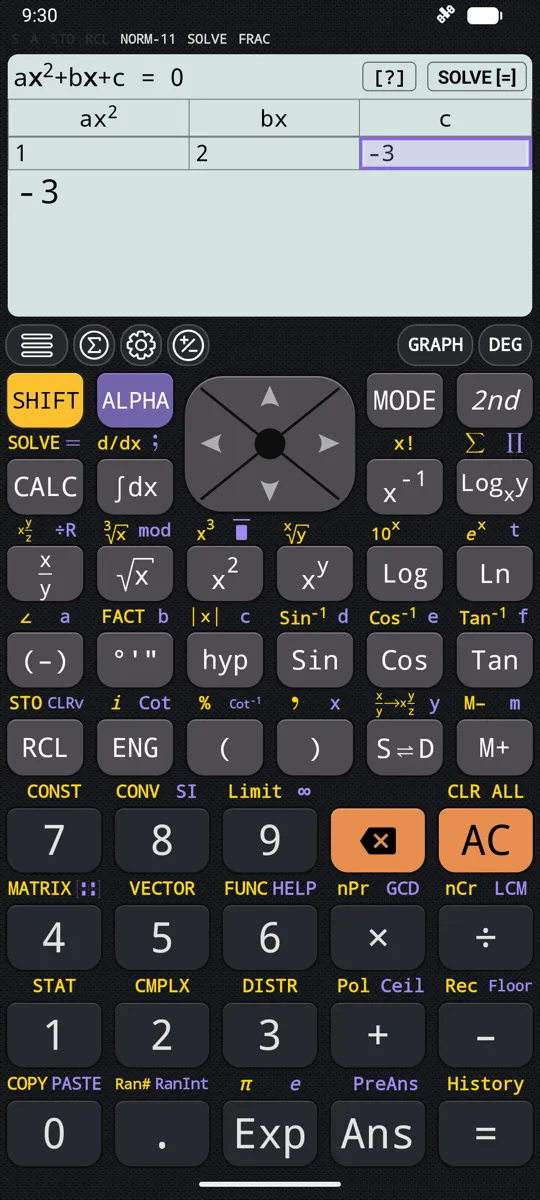
Every polynomial and system mode opens on the same thing: a grid of cells with the coefficients named across the top. Type a number, press equals, and the selection moves to the next cell. Nothing about the equation itself is typed out, because the powers of x are implied by the position of the cell. The grid is sized by the mode, from three cells for a quadratic equation to twenty for a system in four unknowns.
- Press MODE, choose the degree or the number of unknowns, and the editor appears sized for it
- Degree 2 is one row of three cells labelled a, b and c: the coefficient of x², the coefficient of x and the constant; degree 5 is one row of six, a to f, from the coefficient of x⁵ down to the constant
- A cell takes a whole expression rather than only a digit - a fraction, √2, or in the equation and system modes a complex number - and equals evaluates it
- The arrow keys move between cells; AC empties every cell and returns the selection to the first
- Enter 0 for any missing term so that every cell holds a value
- Tap any displayed answer to switch it between fraction and decimal
in a = 0, b = 2, c = 4 in the degree-2 editor
out x = -2
With a = 0 the equation is linear, so a single root is shown, labelled x, and there is no vertex to report.
§ ii Quadratic equations: both roots and the vertex
The degree-2 mode returns four things in sequence rather than two. First the roots x1 and x2, then the x and y coordinates of the turning point of the parabola. When a is positive the curve opens upward and the turning point is labelled a minimum; when a is negative the same two steps read maximum instead. Equals steps through them one at a time and then hands the coefficients back for editing.
To solve a quadratic equation
- 1. Press MODE and choose Solve polynomial of degree 2.
- 2. Type a, the coefficient of x², and press =. The selection moves on to b.
- 3. Type b and press =, then c and press =. Enter 0 for a term the equation leaves out.
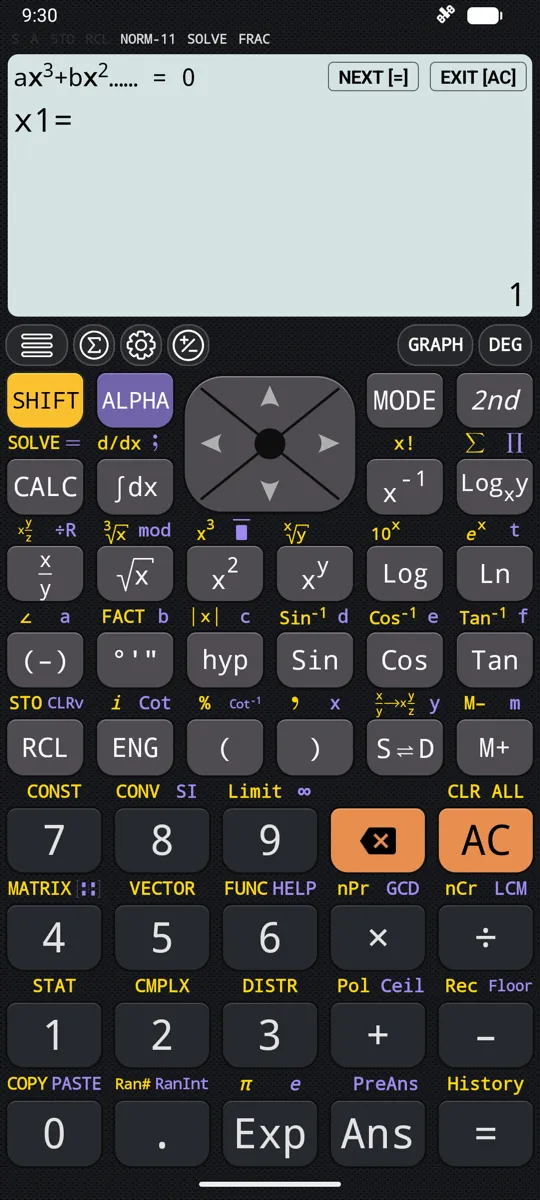
- 4. Press = again, or tap SOLVE [=], and x1 appears.
- 5. Press = to step on to x2, then to the x and y values of the vertex. After the last, the editor returns.
- x1 and x2, which may be equal or a complex conjugate pair
- x-VALUE MINIMUM and y-VALUE MINIMUM when a > 0
- x-VALUE MAXIMUM and y-VALUE MAXIMUM when a < 0
- The two roots are copied into the variables X and Y, so they can be reused without retyping
- The vertex is displayed only; it is not stored in a variable
- No solution and Infinite solution store nothing, and X and Y keep whatever they already held
in a = 1, b = -2, c = -3, for x² - 2x - 3 = 0
out x1 = -1, x2 = 3, x-VALUE MINIMUM = 1, y-VALUE MINIMUM = -4
a = 1 is positive, so the parabola opens upward and the turning point is reported as a minimum.
§ iii Cubic, quartic and quintic equations
Above degree 2 the editor grows by one cell for each power and the answer becomes a list of roots. A cubic equation always returns three, a quartic four and a quintic five, counted with repetition, so the list is never short. Degree 5 takes a moment longer to solve than the lower degrees. Once the roots are known, the same polynomial can be differentiated or integrated, with the answer returned as an expression rather than a number.
- Degree 3 solves a·x³ + b·x² + c·x + d = 0 from four cells, giving x1 to x3
- Degree 4 solves from five cells, giving x1 to x4; a quartic has 0, 2 or 4 real roots
- Degree 5 solves from six cells, giving x1 to x5
- Equals steps from one root to the next and then returns to the editor
- Roots above degree 2 are displayed only, so X, Y, Z, T and U keep their existing values
- Exact roots stay exact, and a tap reads any of them as a decimal
in 1, -15, 85, -225, 274, -120 in the degree-5 editor
out x1 = 1, x2 = 2, x3 = 3, x4 = 4, x5 = 5
These are the coefficients of x⁵ - 15x⁴ + 85x³ - 225x² + 274x - 120, which is (x - 1)(x - 2)(x - 3)(x - 4)(x - 5) multiplied out.
§ iv Complex roots, and when there is no solution
A negative discriminant does not stop the solve. The roots come back as a complex conjugate pair, and in degree 2 they are stored in X and Y like any other pair. The cases that are not really equations are named rather than fudged: when every coefficient of x is zero a dialog reads No solution or Infinite solution, and OK returns to the editor.
- x² + 1 = 0 gives X = -i and Y = i, stored as ordinary values
- A cubic always has at least one real root; the other two may be a conjugate pair
- Any non-real roots of a quartic or a quintic arrive in conjugate pairs
- Degree 2 with a = 0 and b ≠ 0 is linear, with the single root x = -c/b and no vertex
- Every coefficient of x zero and a non-zero constant: No solution
- Every coefficient zero: Infinite solution, since 0 = 0 holds for all x
in a = 1, b = -2, c = 2, d = -1, for x³ - 2x² + 2x - 1 = 0
out x1 = 1, x2 = 1/2 - (√3/2)i, x3 = 1/2 + (√3/2)i
The real root splits off the factor x - 1 and leaves a quadratic whose discriminant is negative.
§ v Polynomial inequalities, answered as intervals
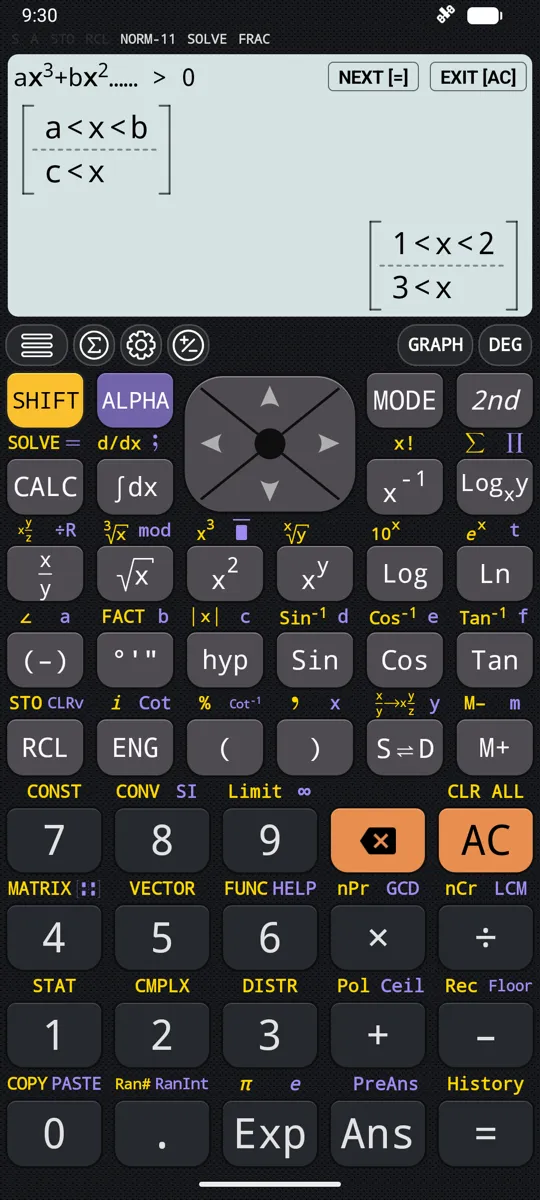
The answer to an inequality is a set, not a number, and the calculator prints it as one. Degrees 2, 3 and 4 each have four modes, one per relation, sharing the coefficient editor and differing only in the comparison against zero. The solution arrives as intervals stacked one to a line and read as "or", with the real roots of the polynomial as the bounds.
- Four relations at each degree: > 0, ≥ 0, < 0 and ≤ 0, chosen from the mode dialog
- Intervals print as x < a, a < x, a < x < b, or x = a for an isolated touch point
- Inclusive relations close the bounds and show them with ≤; strict relations leave them open
- Complex roots are ignored, since they are not bounds on the real line
- A repeated root where the sign does not change becomes an isolated point rather than a split: x³ - 10x² + 33x - 36 ≥ 0 returns x = 3 on one line and 4 ≤ x on the next
- A polynomial that never crosses zero returns No solution or Infinite solution: x⁴ + 1 < 0 has none, x⁴ + 1 > 0 has all of them
- The whole set fits one page; AC or equals returns to the editor
in a = 1, b = -1, c = -2 in the > 0 mode, for x² - x - 2 > 0
out x < -1, 2 < x
x² - x - 2 factorises as (x + 1)(x - 2), so the parabola is positive outside its roots -1 and 2; with the ≤ relation the same coefficients give the single line -1 ≤ x ≤ 2.
§ vi Simultaneous linear equations
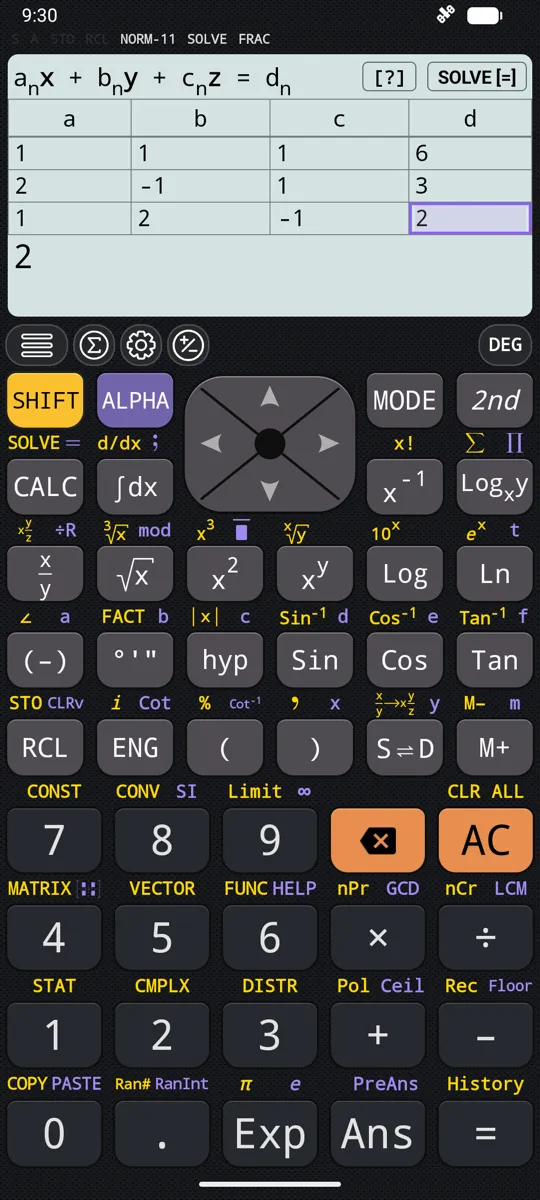
A system of equations in two, three or four unknowns, one equation to a row. The grid carries one more column than there are unknowns, and that last column holds the constant on the right-hand side. The unknowns are read out one at a time and stored afterwards, so a solved value can go straight into the next calculation. The same system can also be set up as a coefficient matrix and worked on with determinants and inverses, which the page on matrices and vectors covers.
To solve three simultaneous equations
- 1. Press MODE and choose Solve system of equations with 3 unknowns.
- 2. In the first row, type the coefficients of x, y and z, then the constant on the right-hand side, pressing = after each.
- 3. Fill the second and third rows the same way, with 0 for any unknown an equation leaves out.
- 4. Press = again, or tap SOLVE [=], and x appears.
- 5. Press = for y, and again for z.
- 2 unknowns: a grid of 2 rows by 3 columns, each row read as a·x + b·y = c
- 3 unknowns: 3 rows by 4 columns, each row read as a·x + b·y + c·z = d
- 4 unknowns: 4 rows by 5 columns, each row read as a·x + b·y + c·z + d·t = e
- The fourth unknown is labelled t, not w
- Solved values are stored in X, Y, Z and T as far as the mode goes
- Dependent equations give Infinite solution; contradictory ones give No solution
in rows 1 1 1 6, then 2 -1 1 3, then 1 2 -1 2
out x = 1, y = 2, z = 3
The rows are x + y + z = 6, 2x - y + z = 3 and x + 2y - z = 2, with the constants in the last column.
§ vii Factorisation, expansion and simplification
Three functions on the second keyboard rewrite an expression instead of evaluating it. FACTOR turns a polynomial into a product, EXPAND multiplies one out, and SIMPLY collects an expression into an equivalent form with fewer terms or operations. All three work on letters as readily as on numbers, so an answer can still carry a, b and y.
- Type the expression first, then press 2nd and FACTOR, EXPAND or SIMPLY
- 2nd EXPAND turns (x + y)³ into x³ + 3x²y + 3xy² + y³
- 2nd EXPAND on (a + b)(a + c + d) gives a² + ab + ac + bc + ad + bd
- 2nd SIMPLY turns a·x² + b·x² into (a + b)x²
- 2nd SIMPLY reduces 2sin(x)² + 2cos(x)² to 2
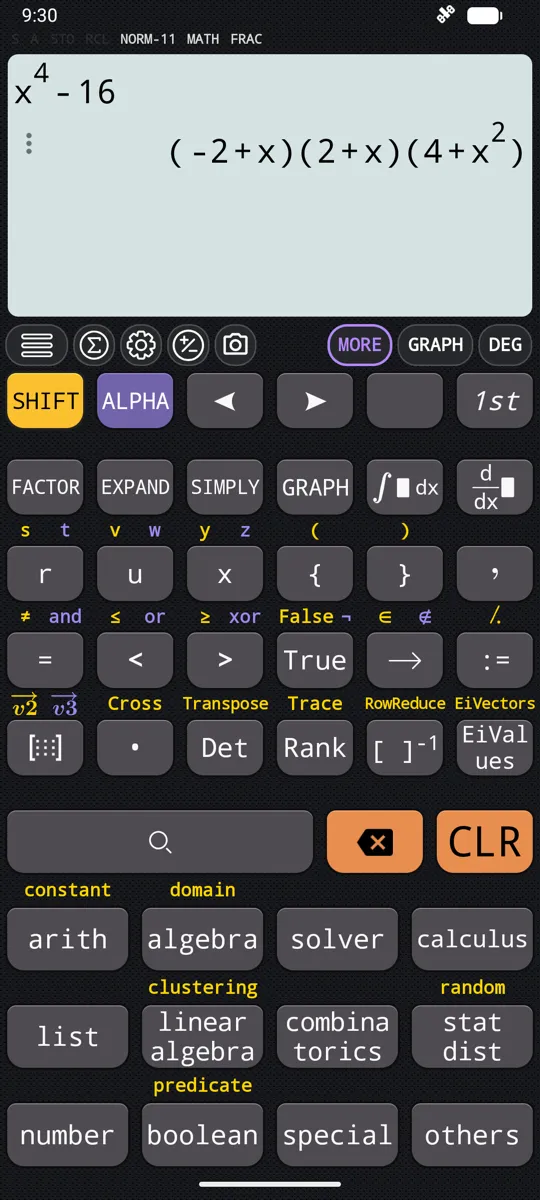
in 1 + 2x + x², then 2nd FACTOR
out (1 + x)²
FACTOR rewrites a polynomial rather than solving it; for the roots, give the same expression to SOLVE.
§ viii SOLVE, for an equation written out in full
Not every equation arrives as a tidy list of coefficients. SOLVE takes one from the input line, two sides joined by an equals sign, and returns every root it can find at once, in a bracketed list with one root to a line. An expression on its own is solved against zero. Answers are exact whenever exactness is possible, including roots that still carry the equation's other variables.
- SHIFT CALC runs SOLVE; the equals sign inside the equation itself is ALPHA CALC
- Solves for x when x appears, and for the only other variable when it does not
- A comma and a variable name at the end choose a different unknown; the comma is SHIFT )
- Other variables are carried through: y = ax² + b returns x = √(-b + y)/√a and its negative
- y + 2 = x, y returns the single line y = -2 + x
- S⇌D rewrites the whole list between exact and decimal form in place
- An equation with no real root returns the complex ones: x² + 1 = 0 gives x = -i and x = i
- x + 1 = x + 2, 1/x = 0 and √x = -1 return Cannot solve equation, as does a symbolic solve with CAS mode switched off
in x² + 2 - 1/x = 4
out x = -1, x = 1/2 - √5/2, x = 1/2 + √5/2
Press S⇌D and the same list reads x = -1, x = -0.61803398875 and x = 1.61803398875.
§ ix Graphing a solved equation or inequality
GRAPH works from inside the polynomial equation and inequality modes at any moment, whether the coefficients are still being typed or a root is already on screen. It plots the polynomial currently in the editor with its roots already marked, and in the equation modes its turning points as well. For the inequality modes it shades the solution set as well, and the shading is a vertical band rather than the area under the curve: it covers exactly the x values that satisfy the relation. The plot screen itself is covered under graphing and tables.
- Degree 2 opens with the roots and the vertex marked
- Degrees 3, 4 and 5 add the extrema and the inflection points
- Every marker can be switched on or off from the graph screen's own controls
- Inequality modes draw the curve, mark its roots, and shade the solution set
- The band runs the full height of the graph, because the condition involves only x, and its edges sit at the roots
- Changing the relation moves the band and leaves the curve exactly where it was
Questions
Can it solve cubic, quartic and quintic equations?
Yes: polynomial equations run from degree 2 to degree 5, one mode for each degree, chosen from the MODE dialog. A cubic returns three roots, a quartic four and a quintic five, counted with repetition, so the list is never short. Degree 5 takes a moment longer to solve than the lower degrees. There is no coefficient mode beyond degree 5; for anything else, SOLVE takes the equation typed out in full and returns every root it can find, or Cannot solve equation when it finds none.
Do I have to type the whole equation out?
Not in the polynomial and system modes. Each one opens a grid of cells with the coefficients named across the top, and the powers of x are implied by the position of the cell rather than typed. A cell takes a whole expression - a fraction, √2, or in the equation and system modes a complex number - and equals evaluates it and moves to the next. Enter 0 for any missing term so that every cell holds a value.
Can it solve simultaneous equations?
Yes, a system of two, three or four linear equations, one equation to a row of the grid. The grid carries one more column than there are unknowns, and that last column holds the constant on the right-hand side. Solved values are stored in X, Y, Z and T as far as the mode goes, so a result can go straight into the next calculation. The fourth unknown is labelled t, not w.
Does it give the vertex of a quadratic as well as the roots?
It does. The degree-2 mode returns four things in sequence: the roots x1 and x2, then the x and y coordinates of the turning point. When a is positive the curve opens upward and the point is labelled a minimum; when a is negative the same two steps read maximum. The two roots are copied into the variables X and Y, but the vertex is displayed only and is not stored.
How do I solve an inequality?
Choose the inequality mode for its degree and relation from the MODE dialog, type the coefficients, and press equals: the answer comes back as a set of intervals rather than a number. Degrees 2, 3 and 4 each have four modes, one for each of > 0, ≥ 0, < 0 and ≤ 0, and the intervals print one to a line, read as "or". The bounds are the real roots of the polynomial, so complex roots are ignored, and a repeated root where the sign does not change becomes an isolated point such as x = 3 rather than a split.
Can it find complex roots?
Yes. A negative discriminant does not stop the solve: x² + 1 = 0 gives X = -i and Y = i, stored as ordinary values in the degree-2 mode. Above degree 2 any non-real roots arrive in conjugate pairs and are displayed rather than stored, so X, Y, Z, T and U keep their existing values. SOLVE on the input line returns them too: x² + 1 = 0 gives x = -i and x = i.
How do I solve an equation for y instead of x?
End the equation with a comma and the name of the unknown, then press SHIFT CALC for SOLVE. The comma is SHIFT ) and y is ALPHA S⇌D; y + 2 = x, y returns the single line y = -2 + x. Without the comma SOLVE solves for x whenever x appears, and for the only other variable when it does not.
Are there equations it cannot solve?
Yes, and it says so plainly. x + 1 = x + 2, 1/x = 0 and √x = -1 all return Cannot solve equation, as does a symbolic solve with CAS mode switched off in settings. In the coefficient modes, every coefficient of x zero with a non-zero constant gives No solution, and every coefficient zero gives Infinite solution; neither case writes anything to the variables.
Elsewhere in the manual
- i. Calculus integrals, derivatives, limits, series
- ii. Graphing and tables curves, shaded areas, tables of values
- iii. Statistics and distributions regression, normal, t, binomial
- iv. Matrices and vectors determinants, eigenvalues, products
- v. Everything else the calculator does the whole index
Written from the calculator’s own manual for version 7.6.0, and every worked example is one that manual shows. Last revised on 25 September 2026.
Bug reports and feature requests go to kimcuc@samatica.com — a person reads it.