Percentages: percent of a number, what percent, increase and decrease in Scientific calculator plus 991 for Android
Type the percentage, then press SHIFT ( for %: 150 × 20% gives 30, which is 20 percent of 150. For what percent 660 is of 880, divide and put % after the whole: 660 ÷ 880% gives 75. With the default setting, a percentage typed after + or − is taken of the left side: 2500 + 15% gives 2,875, and 3500 − 25% gives 2,625. Next to × and ÷ a percentage is always divided by 100; next to + and − a setting, Percentage calculation type, decides.
- Key
- SHIFT ( types %
- Multiply, divide
- a percentage is always divided by 100
- Add, subtract
- depends on a setting; taken of the left side by default
- Setting
- Settings → Calculation → Percentage calculation type
A number followed by SHIFT ( % becomes a percentage. Next to × and ÷ it is always divided by 100. Next to + and − it depends on a setting, because two conventions disagree and the calculator lets you choose between them.
A percentage of a number
Multiply the number by the percentage, and press SHIFT ( % after the percentage. Next to × the setting plays no part: the percentage is simply divided by 100.
in 150 × 20%
out 30
What percent one number is of another
Divide the part by the whole, and put % after the whole:
in 660 ÷ 880%
out 75
So 660 is 75 percent of 880.
Increase or decrease by a percentage
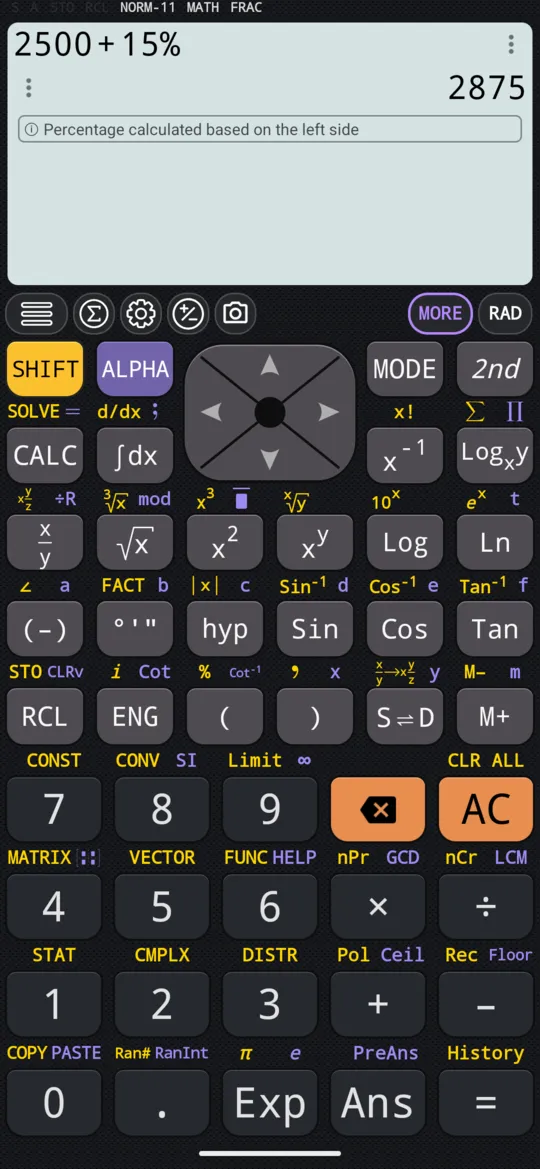
With the default setting, type the percentage straight after + or −. The calculator takes that percentage of the left side, adds it or takes it off, and says so on a line under the answer: Percentage calculated based on the left side.
in 2500 + 15%
out 2875
in 3500 - 25%
out 2625
The setting
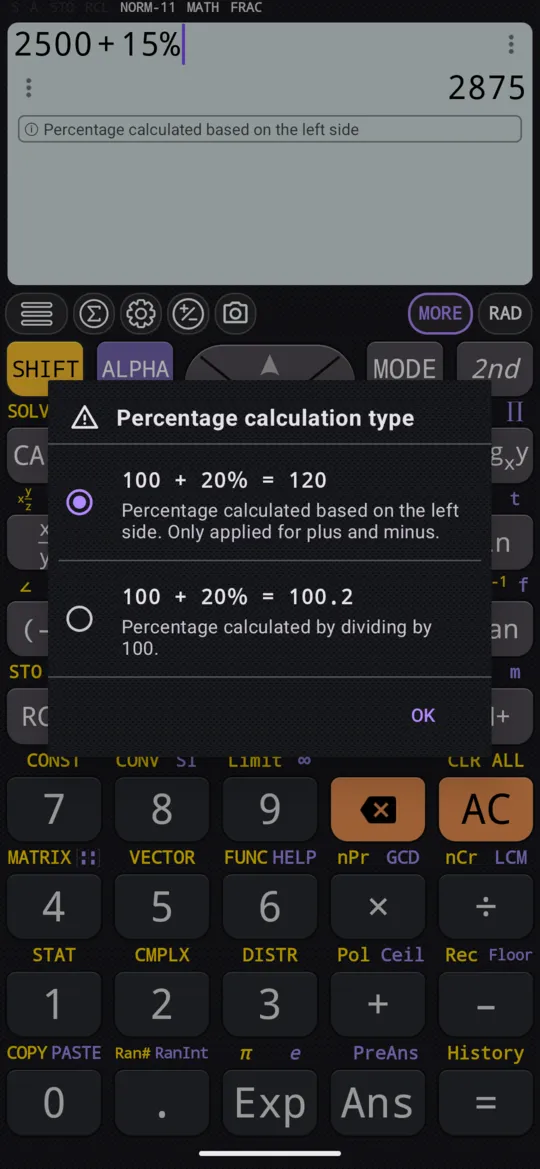
The setting is Percentage calculation type, under Settings → Calculation. It changes only what a percentage means after + and −, and offers two choices:
- Percentage calculated based on the left side, the default: a percentage after + or − is taken of the left side. 50 + 10% is 55.
- Percentage calculated by dividing by 100: a percentage is divided by 100, whatever it is added to or taken from. 50 + 10% is 50.1.
The first time you press %, the calculator asks which of the two you want. You can change your mind later in Settings.
With the divide-by-100 choice, work the percentage out inside the calculation: multiply the number by the percentage, then add or subtract. The answers are the same as above:
in 2500 + 2500 × 15%
out 2875
in 3500 - 3500 × 25%
out 2625
At a glance
Every % below is SHIFT ( %; the last two rows are for the divide-by-100 choice.
| To work out | Type | Gives |
|---|---|---|
| 20% of 150 | 150 × 20% | 30 |
| What percent 660 is of 880 | 660 ÷ 880% | 75 |
| 2,500 increased by 15% | 2500 + 15% | 2,875 |
| 3,500 discounted by 25% | 3500 − 25% | 2,625 |
| 2,500 increased by 15%, written out | 2500 + 2500 × 15% | 2,875 |
| 3,500 discounted by 25%, written out | 3500 − 3500 × 25% | 2,625 |
Questions
How do I find a percentage of a number?
Type the number, ×, then the percentage, and press SHIFT ( for % before =: 150 × 20% gives 30. Next to × and ÷ a percentage is always divided by 100, whatever the setting.
How do I work out what percentage one number is of another?
Divide the part by the whole, and put % after the whole: 660 ÷ 880% gives 75, so 660 is 75 percent of 880.
How do I add a percentage, or take one off?
With the default setting, type the percentage after + or −, and it is taken of the left side: 2500 + 15% gives 2,875, a 15 percent increase, and 3500 − 25% gives 2,625, a 25 percent discount. If the setting is on Percentage calculated by dividing by 100, multiply the percentage out yourself instead: 2500 + 2500 × 15% gives 2,875.
Why does 50 + 10% give 50.1 and not 55?
Because the Percentage calculation type setting is on its second choice, Percentage calculated by dividing by 100: a percentage is simply divided by 100, and 50 + 10% is 50.1. The first choice, the default, Percentage calculated based on the left side, gives 55. Change it under Settings → Calculation; the calculator also asks which you want the first time you press %.
Related pages
- Fractions, mixed numbers and recurring decimals x/y and SHIFT x/y, adding and subtracting them, recurring decimals, S⇌D
- Remainders, mod, floor, ceiling and absolute value mod and ÷R, rounding down and up, and the absolute value
- Numbers, arithmetic and complex numbers which mode and which page, the keys, and how numbers are held
Written from the calculator's own manual and from the app itself, version 7.6.0; every figure is one the manual shows or a capture of the app proves. Last revised on 29 September 2026.
Bug reports and feature requests go to kimcuc@samatica.com — a person reads it.