Angle units and trigonometry: degrees, radians, DMS and all six functions in Scientific calculator plus 991 for Android
Tap the DEG, RAD or GRA key just under the display to change the angle unit: Sin(90) is 1 in degrees, Cos(π) is −1 in radians. Sin, Cos and Tan have keys of their own, with their inverses on SHIFT. ALPHA ENG gives Cot and ALPHA ( gives Cot⁻¹; Sec, Csc and their inverses are on the Trigonometric tab of the hyp key's menu. The hyperbolic functions on its other tab take plain numbers and ignore the angle unit. The °'" key types degrees, minutes and seconds: 2°20'30" + 0°39'30" is 3°0'0.00".
- Angle unit
- DEG, RAD or GRA, the key under the display
- Sin, Cos, Tan
- their own keys; SHIFT for the inverses
- Cot, Sec, Csc
- Cot on ALPHA ENG; Sec and Csc on the hyp menu
- Degrees, minutes, seconds
- the °'" key after each part
A trigonometric function reads its angle in the unit the calculator is set to, so check that unit first: it is the DEG, RAD or GRA key at the right-hand end of the row just under the display.
Degrees, radians or gradians
The key at the right-hand end of the row under the display reads DEG, RAD or GRA. Tap it, choose the unit and press OK; the same setting is under Settings → Calculation.
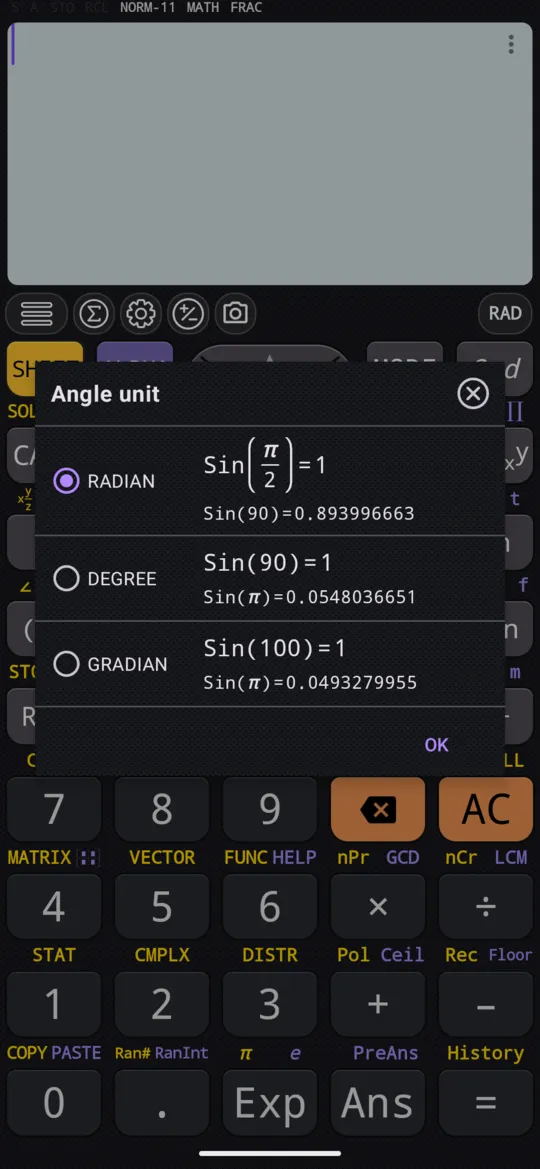
Every trigonometric function and its inverse follows the angle unit, so the same number gives a different answer in each: the dialog shows Sin(90) as 1 beside DEGREE but 0.893996663 beside RADIAN, where a right angle is π/2. A gradian is a hundredth of a right angle, so beside GRADIAN it is Sin(100) that is 1.
in Sin(90)
out 1
The number π is on SHIFT Exp π:
in Cos(π)
out -1
Sin, Cos and Tan
To work out a sine, cosine or tangent
-
Check the angle unit on the key under the display.
-
Press Sin, Cos or Tan. The function name and an opening bracket appear.
-
Type the angle and press =. The closing bracket can be left off.
The inverse functions are the same keys after SHIFT: SHIFT Sin Sin⁻¹, SHIFT Cos Cos⁻¹ and SHIFT Tan Tan⁻¹. They answer in the angle unit that is set.
Cot, Sec and Csc
The other three are the reciprocals of Tan, Cos and Sin; only Cot has a key.
- Cot is ALPHA ENG Cot, and Cot⁻¹ is ALPHA ( Cot⁻¹.
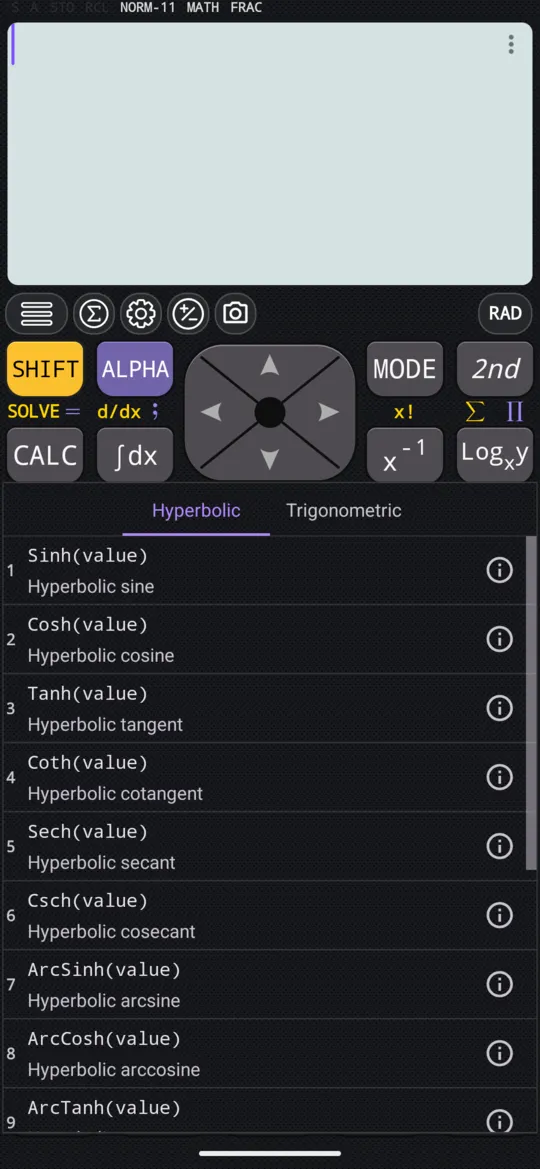
- Sec, Csc and their inverses have no keys: press hyp, open the menu's Trigonometric tab and choose Sec, Csc, ArcSec or ArcCsc. Cot and ArcCot are on that tab too.
in Cot(π/4)
out 1
in Sec(π/3)
out 2
Cot⁻¹ answers in the angle unit, here degrees:
in Cot⁻¹(1)
out 45
Hyperbolic functions
The hyp key opens a menu with the six hyperbolic functions, Sinh, Cosh, Tanh, Coth, Sech and Csch, and their six inverses, listed as ArcSinh to ArcCsch. The menu reopens on the tab you used last. Their arguments are plain numbers, not angles, so the angle unit does not affect them. Choose one, type its argument and press =.
in Sinh(5)
out 74.20321057779
in Cosh⁻¹(3)
out 1.76274717404
The display writes ArcCosh as Cosh⁻¹. In symbolic calculation, FRAC on the status line, Sinh(5) and Cosh⁻¹(3) stay as they are, with the decimal on the line beneath; S⇌D switches to numeric calculation, DECI, which gives the decimal alone, as above.
Degrees, minutes and seconds
The °'" key types an angle in degrees, minutes and seconds, DMS for short. Press it after each part: 2, °'", 20, °'", 30, °'" types 2°20'30". Always type something for the degrees and the minutes, even a 0.
Adding or subtracting two such values, or multiplying or dividing one by an ordinary number, gives an answer in degrees, minutes and seconds:
in 2°20'30" + 0°39'30"
out 3°0'0.00"
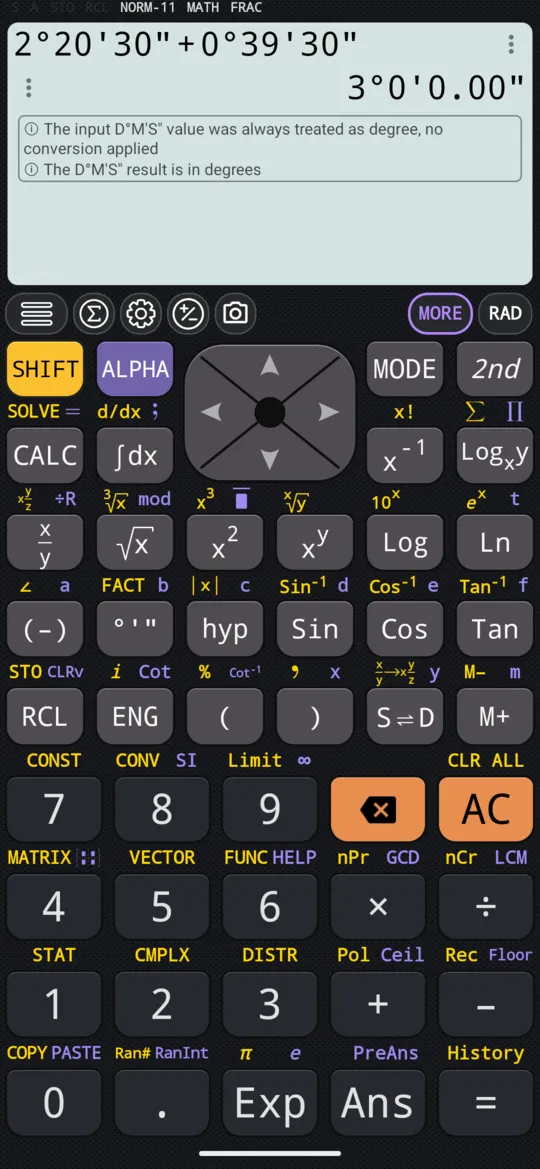
A value typed with °'" is always read as degrees, whatever the angle unit: the phone above is in RAD, and says so under the answer.
The same key converts an answer. Pressed after an answer in degrees, minutes and seconds, it turns it into a single number of degrees:
in 2°15'18"
out 2°15'18.00"
in 2°15'18"
out (451/200)
In symbolic calculation the degrees come as the fraction 451/200, with the decimal, 2.255, beneath it. A second press of °'" brings back 2°15'18.00".
At a glance
| Keys | Function |
|---|---|
| DEG, RAD or GRA, tapped | Changes the angle unit |
| Sin, Cos, Tan | Sine, cosine, tangent |
| SHIFT Sin Sin⁻¹ and the same on Cos and Tan | The inverses |
| ALPHA ENG Cot, ALPHA ( Cot⁻¹ | Cotangent and its inverse |
| hyp, Trigonometric tab | Sec, Csc and their inverses |
| hyp, Hyperbolic tab | Sinh to Csch and their inverses |
| °'" | Types degrees, minutes, seconds; converts an answer |
| SHIFT Exp π | π |
Questions
How do I switch between degrees and radians?
Tap the DEG, RAD or GRA key at the right-hand end of the row just under the display, choose the unit and press OK; the same setting is under Settings → Calculation. Every trigonometric function then reads its angle in that unit: Sin(90) is 1 in degrees, and Cos(π) is −1 in radians.
Why does sin 90 not give 1?
Because the calculator is in radians or gradians, where 90 is not a right angle: in radians Sin(90) is 0.893996663, as the Angle unit dialog shows beside RADIAN. Check the key under the display: Sin(90) is 1 only when it reads DEG.
How do I calculate sec, csc and cot?
ALPHA ENG gives Cot and ALPHA ( gives Cot⁻¹. Sec, Csc and their inverses are on the hyp key's menu, on its Trigonometric tab. In radians, Cot(π/4) is 1 and Sec(π/3) is 2.
How do I turn degrees, minutes and seconds into degrees?
Press °'" after each part to type the angle: 2, °'", 15, °'", 18, °'" types 2°15'18". Press = and then °'" again, and the answer turns into degrees alone: 451/200, with its decimal, 2.255, beneath it. A second press brings back 2°15'18.00".
Related pages
- Rectangular and polar coordinates Pol and Rec: x and y to r and θ, and back again
- Complex numbers CMPLX mode, a + bi and r∠θ, Re, Im, Abs, Arg, the conjugate and the polar form
- Powers, roots and logarithms x², xʸ and x³; square, cube and nth roots; eˣ, 10ˣ, ln, log and a log to any base
- Numbers, arithmetic and complex numbers which mode and which page, the keys, and how numbers are held
Written from the calculator's own manual and from the app itself, version 7.6.0; every figure is one the manual shows or a capture of the app proves. Last revised on 29 September 2026.
Bug reports and feature requests go to kimcuc@samatica.com — a person reads it.