Rectangular and polar coordinates: Pol, Rec and ►r∠φ in Scientific calculator plus 991 for Android
Pol, on SHIFT +, turns rectangular (Cartesian) coordinates into polar ones: in degrees, Pol(√2, √2) gives 2∠45, a distance of 2 at an angle of 45°. Rec, on SHIFT −, goes the other way: Rec(√2, 45) gives x = 1 and y = 1, one above the other. The two numbers go in the brackets, parted by a comma, which is SHIFT ). The angle is in the angle unit that is set, DEG in these examples. For a complex number, ►r∠φ in CMPLX mode gives its polar form.
- To polar
- SHIFT + (Pol): Pol(x, y)
- To rectangular
- SHIFT − (Rec): Rec(r, θ)
- Comma
- SHIFT )
- Angle unit
- DEG, RAD or GRA, whichever is set
A point can be given by its rectangular (Cartesian) coordinates, x and y, or by its polar coordinates: its distance r from the origin and the angle θ from the positive x-axis. Pol and Rec convert between the two. Both are SHIFT functions, printed in yellow above the + and − keys.
Rectangular to polar: Pol
How to convert to polar coordinates
-
Check the DEG, RAD or GRA key just under the display: Pol gives θ in that unit.
-
Press SHIFT + Pol to start the function.
-
Type x, then press SHIFT ) , for the comma and type y. If x ends in a square root, such as √2, first press right to move the cursor out of the root.
-
Press =. The answer is r, the angle sign, then θ.
in Pol(√2, √2)
out 2∠45
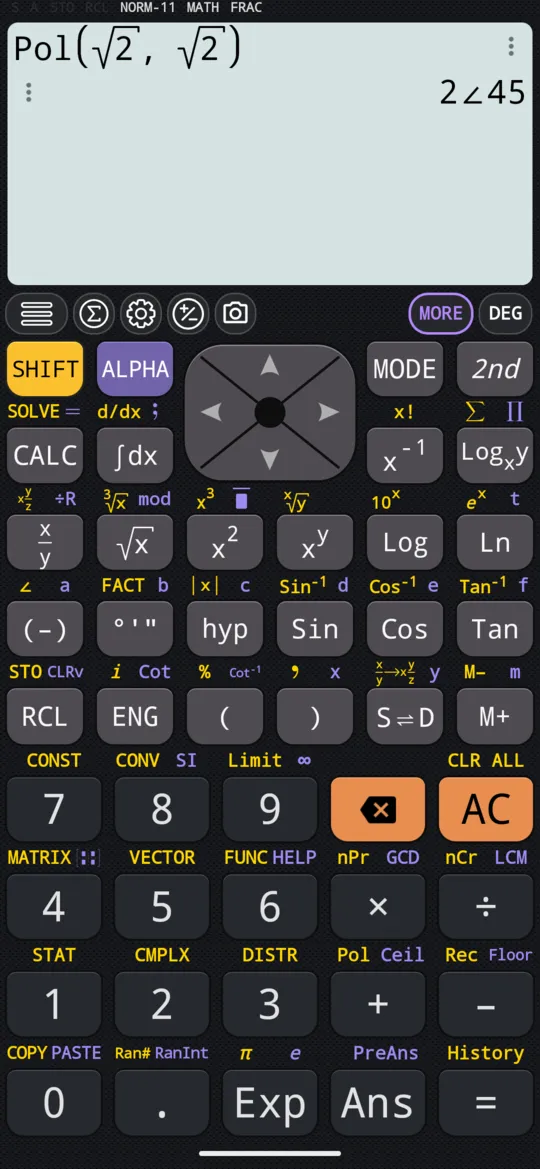
Polar to rectangular: Rec
Rec works the same way, with r and θ in the brackets: press SHIFT - Rec and type r, the comma and θ, pressing right after √2 as before. The answer comes on two lines, x above y.
in Rec(√2, 45)
out [x = 1; y = 1]
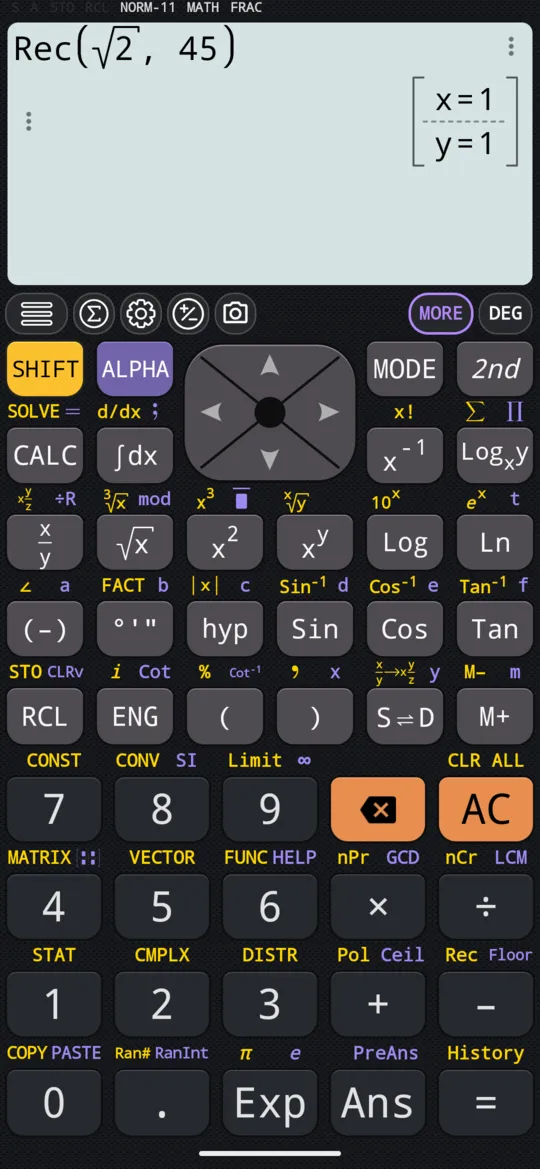
Pol gives θ, and Rec reads it, in the angle unit that is set, DEG, RAD or GRA; Angle units and trigonometry shows how to change it.
For complex numbers: ►r∠φ
A complex number a + bi is a point too, and in CMPLX mode ►r∠φ converts it: put at the end of a calculation, it gives the answer in polar form, and ►a+bi turns it back. Both are on the complex menu, which SHIFT 2 CMPLX opens in that mode, and Complex numbers covers them.
At a glance
| Keys | Function | Example, in degrees |
|---|---|---|
| SHIFT + Pol | Rectangular to polar | Pol(√2, √2) = 2∠45 |
| SHIFT - Rec | Polar to rectangular | Rec(√2, 45): x = 1, y = 1 |
| SHIFT ) , | The comma between the two numbers | |
| right | Leaves a root before the comma |
Questions
How do I convert rectangular coordinates to polar?
Press SHIFT + (Pol), type x, press SHIFT ) for the comma, type y and press =. In degrees, Pol(√2, √2) gives 2∠45: r = 2 and θ = 45°. If x ends in a square root, such as √2, press the right arrow after it to leave the root before the comma.
How do I convert polar coordinates to rectangular?
Press SHIFT − (Rec), type r, press SHIFT ) for the comma, type θ and press =. For Rec(√2, 45), press the right arrow after √2 to leave the root. In degrees it gives x = 1 on the first line and y = 1 on the second.
Does the angle have to be in degrees?
No. Pol gives θ, and Rec reads it, in the angle unit that is set: DEG, RAD or GRA, on the key just under the display. The examples here are in degrees.
Related pages
- Angle units and trigonometry degrees, radians, gradians, the six trig functions and inverses, hyperbolics, DMS
- Complex numbers CMPLX mode, a + bi and r∠θ, Re, Im, Abs, Arg, the conjugate and the polar form
- Numbers, arithmetic and complex numbers which mode and which page, the keys, and how numbers are held
Written from the calculator's own manual and from the app itself, version 7.6.0; every figure is one the manual shows or a capture of the app proves. Last revised on 29 September 2026.
Bug reports and feature requests go to kimcuc@samatica.com — a person reads it.