Rank, row reduction, trace and eigenvalues of a matrix in Scientific calculator plus 991 for Android
On the 2nd keyboard, Rank inserts MatrixRank(, SHIFT [ ]⁻¹ inserts RowReduce(, SHIFT Rank inserts Tr( for the trace, and EiValues and SHIFT EiValues insert Eigenvalues( and Eigenvectors(; fill a matrix template inside and press =. MATRIX Mode lists the same functions in the MATH section of its menu. RowReduce([[1,2,5],[3,4,11]]) solves x + 2y = 5 and 3x + 4y = 11: the last column reads x = 1, y = 2.
- Rank
- Rank key: MatrixRank(
- Row reduction
- SHIFT [ ]⁻¹: RowReduce(
- Trace
- SHIFT Rank: Tr(; any shape
- Eigen
- EiValues, SHIFT EiValues (EiVectors); square only
These are the functions a linear-algebra course reaches after the determinant: how many rows of a matrix are independent, the simplest form row operations can bring it to, the sum of its diagonal, and the numbers and directions that describe what it does. Each has a key on the 2nd keyboard, and MATRIX Mode lists them in the MATH section of its menu, where they take a stored matrix by name.
Rank
The rank counts how many rows are genuinely independent of each other. On the 2nd keyboard, the key is marked Rank but inserts MatrixRank(, which is the name to look up in the app's help. The manual's R is [[1, 2, 3], [4, 5, 6]], and both its rows are independent:
in MatrixRank([1, 2, 3; 4, 5, 6])
out 2
Here the second row is just twice the first, so only one row is independent:
in MatrixRank([1, 2; 2, 4])
out 1
In MATRIX Mode, MatrixRank(matrix) is in the MATH section and takes a stored matrix. The manual's MatC, [[1, 2, 3], [4, 5, 6], [7, 8, 10]], has no redundant row:
in MatrixRank(MatC)
out 3
Row reduction: solve a system
RowReduce(matrix) reduces a matrix to its simplest row form. It is the quickest way to solve a system of linear equations by row operations: write the coefficients and the constants as one matrix, reduce it, and read the answers from the last column.
To solve x + 2y = 5 and 3x + 4y = 11 by row reduction
-
Write each equation as a row of coefficients and its constant: 1, 2, 5 and 3, 4, 11.
-
Press 2nd, then SHIFT [ ]⁻¹ RowReduce. RowReduce( appears on the input line.
-
Press the template key, [::], and choose 2 rows and 3 columns.
-
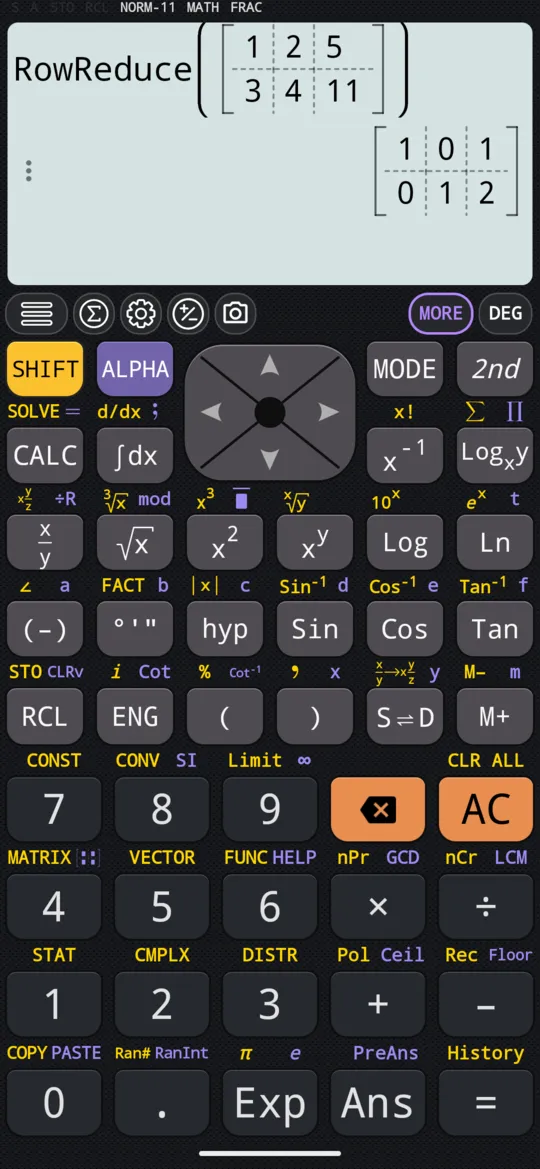
Press 1st, type the six numbers with right between them, and press =.
in RowReduce([1, 2, 5; 3, 4, 11])
out [1, 0, 1; 0, 1, 2]
The left part of the answer is the identity, so each row now says one unknown on its own: 1x + 0y = 1 and 0x + 1y = 2. The last column reads 1 and 2, so x = 1 and y = 2.
When the values are all you need, the simultaneous-equation mode takes the same rows as a grid of coefficients, for two to four unknowns, and gives each value in turn. RowReduce shows the reduced matrix itself, which is what a question on row operations asks to see.
Trace and diagonal
The trace is the sum of the elements down the main diagonal. On the 2nd keyboard it is SHIFT Rank Trace, which inserts Tr(. With the manual's P, [[1, 2], [3, 4]], that is 1 + 4:
in Tr([1, 2; 3, 4])
out 5
Unlike the determinant, it does not need a square matrix; it simply adds whatever lies on the diagonal. For R, [[1, 2, 3], [4, 5, 6]], that is 1 + 5:
in Tr([1, 2, 3; 4, 5, 6])
out 6
Diagonal(matrix) lists the elements Tr adds up. It has no key: choose it from the linear algebra menu.
in Diagonal([1, 2, 3; 4, 5, 6; 7, 8, 9])
out {1, 5, 9}
Eigenvalues and eigenvectors
The eigenvalues of a square matrix are the numbers by which it stretches its own special directions, and the eigenvectors are those directions. One key on the 2nd keyboard gives both: EiValues inserts Eigenvalues(, and SHIFT EiValues EiVectors inserts Eigenvectors(.
To find the eigenvalues of a 2 × 2 matrix
-
Press 2nd, then EiValues. Eigenvalues( appears on the input line.
-
Press the template key, [::], and choose 2 rows and 2 columns.
-
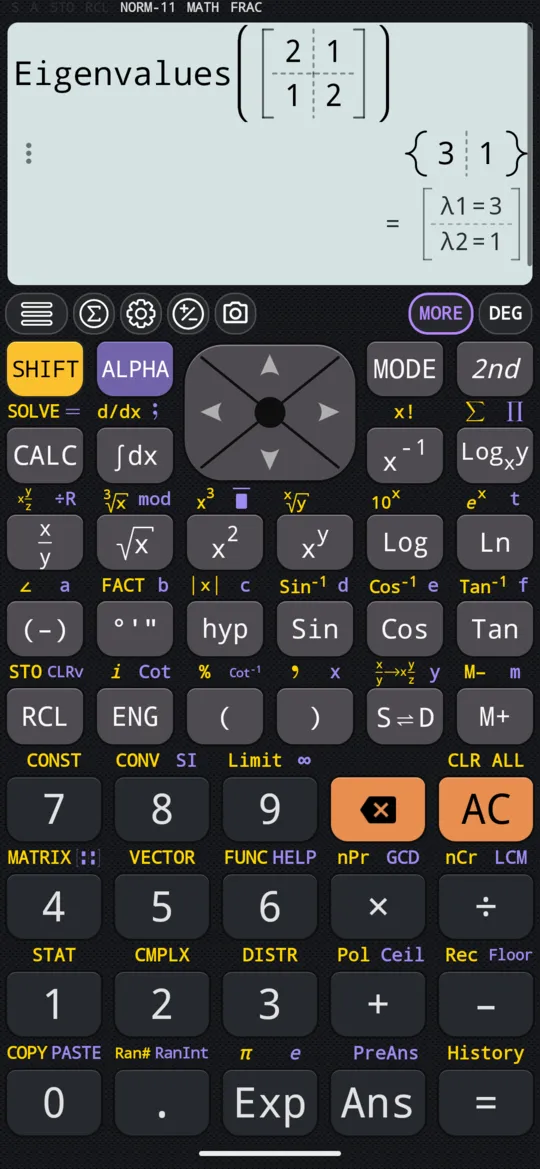
Press 1st, type 2 right 1 right 1 right 2, and press =.
in Eigenvalues([2, 1; 1, 2])
out {3, 1}
For the eigenvectors, press SHIFT EiValues EiVectors in the first step instead. Each row of the answer is the direction belonging to one eigenvalue, in the same order as the eigenvalues came out:
in Eigenvectors([2, 1; 1, 2])
out [1, 1; -1, 1]
So (1, 1) belongs to the eigenvalue 3, and (−1, 1) to the eigenvalue 1. Both functions need a square matrix.
In MATRIX Mode, Eigenvalues(matrix) and Eigenvectors(matrix) are in the MATH section too, and take a stored matrix by name.
The linear algebra menu
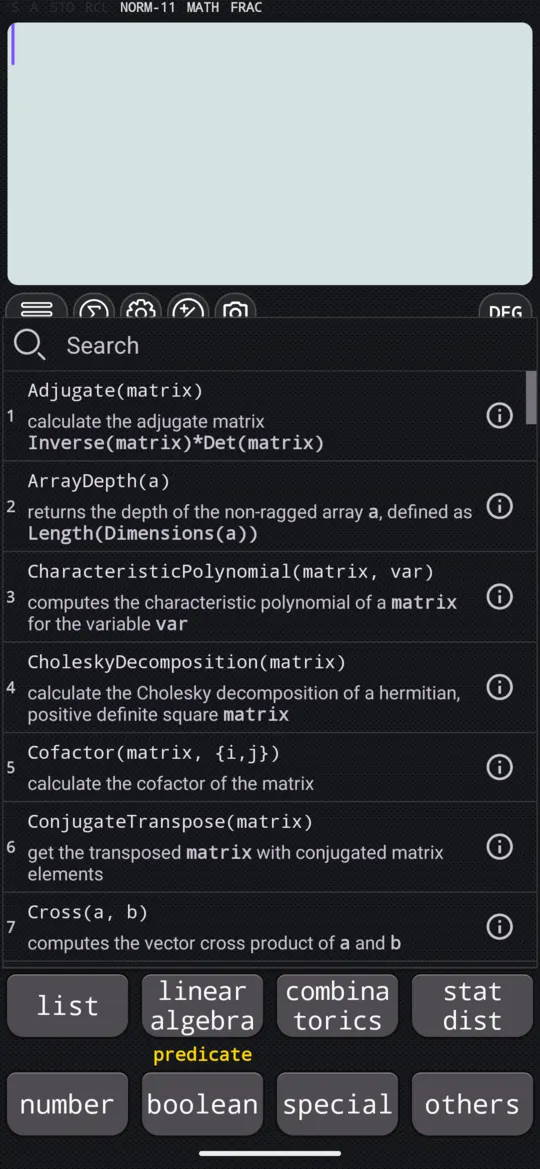
The linear algebra key on the 2nd keyboard opens a list of about sixty linear-algebra functions, everything above and much more; type in the search box at the top to filter it. For longer work it carries, among others:
- CharacteristicPolynomial(matrix, var), the characteristic polynomial, whose roots are the eigenvalues.
- LinearSolve(matrix, right), which solves a system directly, and LeastSquares(matrix, right), the best fit for an over-determined one.
- NullSpace(matrix) and PseudoInverse(matrix).
- LUDecomposition(matrix), QRDecomposition(matrix) and SingularValueDecomposition(matrix).
- DiagonalMatrix(list), which builds a matrix from its diagonal, with Adjugate(matrix), Minors(matrix), MatrixPower(matrix, n) and MatrixExp(matrix).
MATRIX Mode's MATH section lists CharacteristicPolynomial, Diagonal, DiagonalMatrix, LeastSquares, LinearSolve, LUDecomposition, SingularValueDecomposition, NullSpace and PseudoInverse as well.
To fit a line or a curve to paired data rather than solve an exact system, use regression and curve fitting in STAT mode instead.
At a glance
| Keys (2nd keyboard) | What they insert |
|---|---|
| Rank | MatrixRank(, the number of independent rows |
| SHIFT Rank Trace | Tr(, the sum of the diagonal |
| SHIFT [ ]⁻¹ RowReduce | RowReduce(, the reduced row form |
| EiValues | Eigenvalues( |
| SHIFT EiValues EiVectors | Eigenvectors( |
| linear algebra | The full list of functions, with a search box |
Questions
How do I solve a system of equations by row reduction?
Write the coefficients and the constant of each equation as one row of a matrix, and reduce it. For x + 2y = 5 and 3x + 4y = 11, RowReduce of the rows 1, 2, 5 and 3, 4, 11 gives [[1, 0, 1], [0, 1, 2]]: the last column reads x = 1 and y = 2. If you only want the values, the simultaneous-equation mode takes the same rows as a grid and reports each unknown in turn.
Can the calculator find eigenvalues and eigenvectors?
Yes. On the 2nd keyboard, EiValues inserts Eigenvalues( and SHIFT EiValues inserts Eigenvectors(; both need a square matrix. Eigenvalues([[2, 1], [1, 2]]) gives {3, 1}, and Eigenvectors of the same matrix gives [[1, 1], [−1, 1]]: each row is the direction of one eigenvalue, in the same order, so (1, 1) belongs to 3 and (−1, 1) to 1.
What does the rank of a matrix tell me?
How many of its rows are genuinely independent of each other. [[1, 2], [2, 4]] has rank 1, because its second row is just twice the first; the 3 × 3 matrix [[1, 2, 3], [4, 5, 6], [7, 8, 10]] has rank 3, with no row that the others make redundant.
Does the trace need a square matrix?
No. Tr adds whatever lies on the main diagonal, so it works on a rectangular matrix too: the trace of [[1, 2, 3], [4, 5, 6]] is 1 + 5 = 6. The determinant, the inverse, the eigenvalues and the eigenvectors are the ones that need a square matrix.
Related pages
- Solve simultaneous linear equations in 2, 3 or 4 unknowns a grid of coefficients in, each unknown out
- Determinant, inverse and transpose of a matrix Det, the inverse in exact fractions, Transpose, the identity
- Enter matrices, then add, subtract and multiply them store MatA to MatD, then + − ×, powers and MatAns
Written from the calculator's own manual and from the app itself, version 7.6.0; every figure is one the manual shows or a capture of the app proves. Last revised on 27 September 2026.
Bug reports and feature requests go to kimcuc@samatica.com — a person reads it.