Determinant, inverse and transpose of a matrix in Scientific calculator plus 991 for Android
In MATRIX Mode, SHIFT 4 (MATRIX) and MATH hold Det(matrix), Inverse(matrix) and Transpose(matrix); give each a stored matrix from NAMES and press =. The x⁻¹ key gives the inverse too. On the 2nd keyboard the same three have keys of their own: Det, [ ]⁻¹, and SHIFT Det for Transpose. The determinant is one number, and the inverse keeps its elements as exact fractions.
- Determinant
- Det(matrix), a single number; square matrices only
- Inverse
- x⁻¹ or Inverse(matrix), in exact fractions
- Transpose
- Transpose(matrix); a 2 × 3 becomes a 3 × 2
- 2nd keyboard
- Det, [ ]⁻¹, SHIFT Det (Transpose)
Three functions describe a single square matrix rather than combine two: the determinant, a number that says whether the matrix can be undone; the inverse, the matrix that undoes it; and the transpose, the same matrix turned on its diagonal. MATRIX Mode lists them in the MATH section of its menu, and the 2nd keyboard gives each a key.
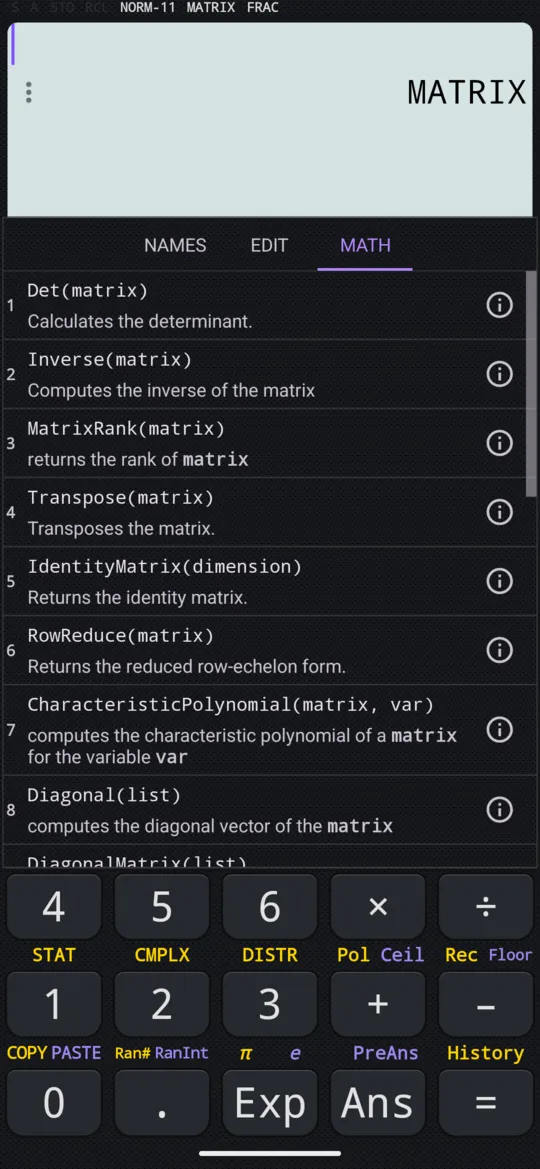
The determinant
To find a determinant in MATRIX Mode
-
Store the matrix, say in MatA, as on entering a matrix.
-
Press SHIFT 4 MATRIX, tap MATH and choose Det(matrix).
-
Press SHIFT 4 MATRIX again, tap NAMES and choose MatA, then press =.
The determinant is a single number, and it tells you whether the matrix can be inverted: a determinant of 0 means it cannot. With the manual's MatA, [[2, 1], [1, 1]]:
in Det(MatA)
out 1
It works for any square size. The manual's MatC is 3 × 3:
| MatC | ||
|---|---|---|
| 1 | 2 | 3 |
| 4 | 5 | 6 |
| 7 | 8 | 10 |
in Det(MatC)
out -3
On the 2nd keyboard, press Det, then fill a matrix template inside its brackets. For the matrix the manual calls P, the answer is 1 × 4 − 2 × 3:
in Det([1, 2; 3, 4])
out -2
in Det([2, 1; 1, 2])
out 3
The inverse
The inverse is the matrix that undoes the original one. Two ways give it, and they agree: the x⁻¹ key after a matrix, and the function Inverse(matrix). Elements are kept as exact fractions where possible.
in MatA⁻¹
out [1, -1; -1, 2]
![MatA, then x⁻¹ and =, in MATRIX Mode: the inverse of [[2, 1], [1, 1]].](/_astro/matrix-inverse.B_WW3tUF_1V77BH.webp)
With the manual's MatB, [[2, −1], [−1, 2]], the inverse comes out in thirds:
in Inverse(MatB)
out [(2/3), (1/3); (1/3), (2/3)]
On the 2nd keyboard the key is [ ]⁻¹. Its marking looks like a power, but it inserts the function Inverse(, and the matrix goes inside the brackets.
To invert a 2 × 2 matrix on the 2nd keyboard
-
Press 2nd, then [ ]⁻¹. Inverse( appears on the input line.
-
Press the template key, [::], and choose 2 rows and 2 columns.
-
Press 1st, type 2 right 1 right 1 right 2, and press =.
in Inverse([2, 1; 1, 2])
out [(2/3), (-1/3); (-1/3), (2/3)]
Only a square matrix whose determinant is not 0 has an inverse. Det(Q) is 3, so Q has one; a matrix whose determinant is 0 has none.
The transpose
Transpose(matrix) flips a matrix over its diagonal, turning its rows into columns. The size flips too, so a 2 × 3 matrix comes back 3 × 2. In MATRIX Mode it is in the MATH section; on the 2nd keyboard it is SHIFT Det Transpose. With the manual's MatD, [[1, 2, 3], [4, 5, 6]]:
in Transpose(MatD)
out [1, 4; 2, 5; 3, 6]
in Transpose([1, 2, 3; 4, 5, 6])
out [1, 4; 2, 5; 3, 6]
The identity matrix
IdentityMatrix(dimension), in the MATH section, builds the square identity matrix of the size you give: 1s down the diagonal and 0s everywhere else. Multiplying a matrix by it leaves the matrix unchanged.
in IdentityMatrix(3)
out [1, 0, 0; 0, 1, 0; 0, 0, 1]
On the 2nd keyboard it is in the linear algebra menu, with DiagonalMatrix, Adjugate, Minors, MatrixPower and MatrixExp.
When there is no answer
- Det, Inverse and powers need a square matrix. Asking for the determinant of a 2 × 3 matrix reports an error; Transpose is the one of the three that takes any shape.
- A determinant of 0 means the matrix has no inverse.
- If a result looks wrong, check the size first: in MATRIX Mode the NAMES list shows each stored size, such as [2×2].
At a glance
| Keys | What they give |
|---|---|
| SHIFT 4 MATRIX, MATH, Det(matrix) | The determinant, one number |
| x⁻¹ after a matrix | Its inverse |
| SHIFT 4 MATRIX, MATH, Inverse(matrix) | The same inverse, as a function |
| SHIFT 4 MATRIX, MATH, Transpose(matrix) | Rows turned into columns |
| SHIFT 4 MATRIX, MATH, IdentityMatrix(dimension) | The identity of that size |
| 2nd Det | Det( on the 2nd keyboard |
| 2nd SHIFT Det Transpose | Transpose( |
| 2nd [ ]⁻¹ | Inverse( |
Questions
How do I find the inverse of a matrix on the calculator?
In MATRIX Mode, insert the stored matrix from NAMES and press x⁻¹, then =: with MatA = [[2, 1], [1, 1]], MatA⁻¹ is [[1, −1], [−1, 2]]. Inverse(matrix) from the MATH section gives the same answer. On the 2nd keyboard, [ ]⁻¹ inserts Inverse( and the matrix goes inside the brackets.
What does a determinant of 0 mean?
That the matrix cannot be inverted. The determinant is a single number that tells you whether a square matrix has an inverse, and only a square matrix with a determinant other than 0 has one. [[1, 2], [3, 4]] has determinant −2, so it can be inverted.
Can it find the determinant of a 3 × 3 matrix?
Yes, and of any square size MATRIX Mode holds, up to 7 × 7. For MatC = [[1, 2, 3], [4, 5, 6], [7, 8, 10]], Det(MatC) is −3. A matrix that is not square has no determinant: asking for that of a 2 × 3 matrix reports an error.
Does the inverse come out as fractions or decimals?
As exact fractions wherever it can. The inverse of [[2, 1], [1, 2]] comes back in thirds, 2/3 and −1/3, rather than as 0.667 and −0.333.
Related pages
- Enter matrices, then add, subtract and multiply them store MatA to MatD, then + − ×, powers and MatAns
- Rank, row reduction, trace and eigenvalues of a matrix MatrixRank, RowReduce, Tr, Eigenvalues and Eigenvectors
- Solve simultaneous linear equations in 2, 3 or 4 unknowns a grid of coefficients in, each unknown out
Written from the calculator's own manual and from the app itself, version 7.6.0; every figure is one the manual shows or a capture of the app proves. Last revised on 27 September 2026.
Bug reports and feature requests go to kimcuc@samatica.com — a person reads it.